As homes become interconnected with advanced technology, the integration of smart home devices presents a unique opportunity for improved efficiency and convenience. Smart home integration involves connecting various devices and appliances to a central system, allowing for streamlined control and management. This concept extends beyond mere gadgetry; it’s about creating an ecosystem within your living space that responds intelligently to your needs and preferences.
Security, comfort, and energy management stand at the forefront of smart home integration. Homeowners can now orchestrate everything from lighting and temperature to security systems with simple voice commands or smartphone controls. Efficiency gains are immediately evident, as these systems enable remote management of resources, leading to potential savings on utility bills. As the technology matures, the methods of integration and the variety of compatible devices continue to expand, making it increasingly accessible to the average consumer.
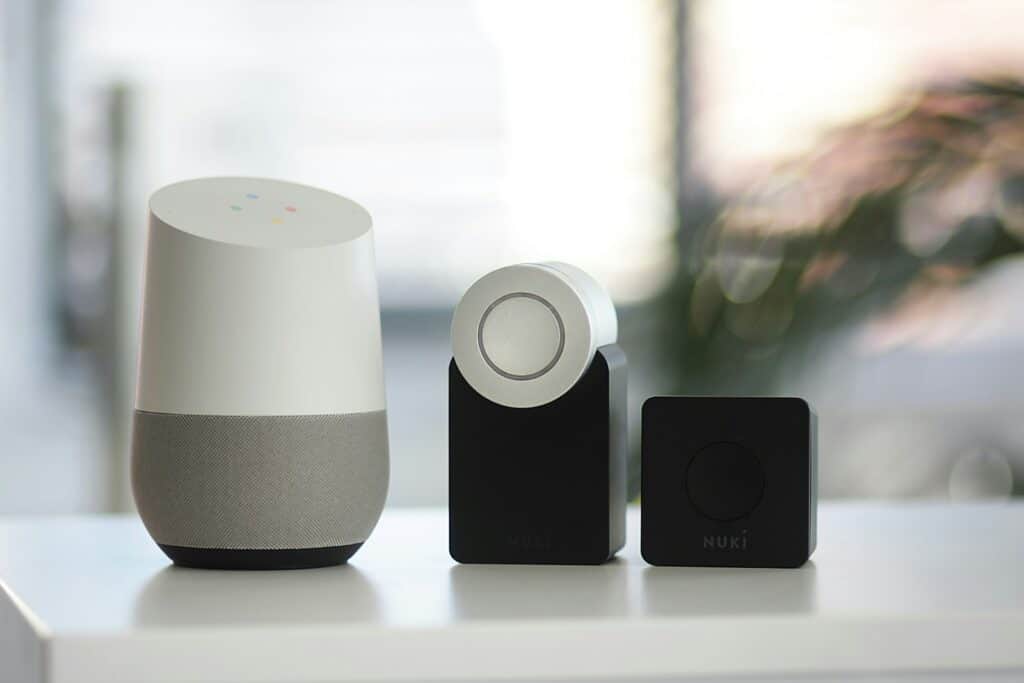
How to Make Your Devices Work Together Seamlessly
Building a smart home is easy—making everything work together smoothly is the real challenge. With the right planning and setup, you can avoid compatibility issues, reduce frustration, and create automations that actually improve daily life. This guide shares practical smart home integration tips to help you get the most out of your devices.
1. Choose a Primary Smart Home Platform First
Before buying devices, decide which ecosystem you’ll build around:
- Apple HomeKit
- Google Home
- Amazon Alexa
- Samsung SmartThings
✅ Pick one main hub and ensure most devices support it. Mixing platforms is possible, but a central controller simplifies automation and voice control.
2. Look for Matter & Thread Support
Newer standards make smart homes more reliable.
Why Matter matters:
- Cross‑platform compatibility
- Easier setup
- Local control (less cloud reliance)
Thread benefits:
- Faster response times
- Better battery life
- Mesh networking
📌 Devices labeled Matter‑enabled or Thread‑compatible are more future‑proof.
3. Use a Dedicated Smart Home Hub
While Wi‑Fi‑only setups work, hubs offer better stability.
Popular hubs:
- Apple HomePod / Apple TV
- Google Nest Hub
- Amazon Echo (with Zigbee)
- SmartThings Hub
✅ Hubs reduce Wi‑Fi congestion and keep automations running even if the internet drops.
4. Standardize Device Brands Where Possible
Using fewer brands:
- Reduces app overload
- Improves compatibility
- Simplifies updates and support
💡 Example: Use one brand for lights, one for switches, one for sensors.
5. Name Devices Clearly and Consistently
Good naming improves voice commands and automation logic.
Best practices:
- Use room + function:
“Living Room Lamp” - Avoid duplicate names
- Keep names short and natural
🚫 Avoid vague names like “Light 1” or “Switch A.”
6. Group Devices by Room and Function
Use your platform’s grouping features to:
- Control multiple lights at once
- Create room‑based automations
- Simplify voice commands
Example:
- “Turn off Bedroom Lights”
- “Set Movie Mode”
7. Build Automations Around Routines, Not Tech
The best smart homes focus on daily habits.
Automation ideas:
- Lights turn on at sunset
- Thermostat lowers at bedtime
- Coffee maker starts when alarm stops
- Motion sensors trigger hallway lights at night
✅ Automate actions, not devices.
8. Mix Voice, App, and Physical Controls
Relying only on voice can be frustrating.
Include:
- Smart switches
- Buttons
- Motion sensors
- App controls
✅ Redundancy keeps your home usable for guests and family members.
9. Secure Your Smart Home Network
Smart homes are part of your digital life.
Security tips:
- Use a strong Wi‑Fi password
- Enable two‑factor authentication
- Keep firmware updated
- Use a guest network for smart devices
🔒 Security is essential for long‑term reliability.
10. Test Automations Gradually
Avoid building complex automations all at once.
Best approach:
- Create one automation
- Test it for a few days
- Adjust timing or triggers
- Add complexity later
✅ Small improvements lead to a smarter home over time.
11. Plan for Manual Overrides
Smart homes should never feel “trapped.”
Make sure:
- Lights still work manually
- Thermostats can be adjusted locally
- Automations can be paused easily
This prevents frustration when things go wrong.
12. Keep Documentation
As your system grows:
- Save login info securely
- Label devices physically if needed
- Document automations
📌 This is especially helpful when troubleshooting or upgrading.
Quick Integration Checklist
| Tip | Why It Matters |
|---|---|
| Choose one platform | Reduces complexity |
| Prefer Matter devices | Future‑proof setup |
| Use a hub | Improves reliability |
| Consistent naming | Better voice control |
| Routine‑based automations | More useful |
| Secure your network | Protects privacy |
Final Takeaway
A great smart home isn’t about having the most devices—it’s about integration, reliability, and simplicity. Start with a strong platform, choose compatible hardware, and build automations around how you actually live.
Creating a Seamless Smart Home Experience
Start with a Plan
Before diving into the world of smart home devices, take some time to plan. Think about which areas of your home you want to automate and what functions are most important to you. This will help you choose the right devices and avoid unnecessary purchases.
Choose a Central Hub
A central hub, like Amazon Alexa, Google Assistant, or Apple HomeKit, can simplify the management of your smart home devices. These hubs allow you to control multiple devices with voice commands or through a single app, making your smart home more user-friendly.
Compatibility is Key
Ensure that the devices you choose are compatible with your chosen central hub. Check for certifications like “Works with Alexa” or “Made for Google” to ensure seamless integration and avoid compatibility issues.
Prioritize Security
Smart home devices can be vulnerable to hacking, so it’s important to prioritize security. Use strong passwords, enable two-factor authentication where available, and keep your devices’ firmware up to date. Consider investing in a dedicated security system to monitor your smart home network.
Consider Automation Routines
Automation routines can make your smart home even more convenient. You can set schedules for lights, thermostats, and other devices to adjust automatically throughout the day, saving you time and energy.
Tips for Smooth Integration
- Start small: Begin with a few essential devices and gradually expand your smart home ecosystem.
- Research thoroughly: Read reviews and compare features before purchasing any device.
- Test and adjust: Experiment with different settings and configurations to find what works best for you.
- Stay informed: Keep up with the latest smart home technology and updates to ensure optimal performance and security.
Smart Home Integration Possibilities
| Device Type | Integration Examples |
|---|---|
| Lighting | Voice-activated lights, motion sensors, scheduled dimming |
| Thermostats | Smart schedules, remote control, energy-saving modes |
| Security Cameras | Remote monitoring, motion detection alerts, facial recognition |
| Door Locks | Keyless entry, remote locking/unlocking, access logs |
| Speakers and Displays | Voice control for other devices, information display, entertainment |
Building a smart home is an exciting journey. By following these tips and doing your research, you can create a connected and convenient living space that caters to your needs and preferences.
Key Takeaways
- Smart home integration streamlines device management and increases household efficiency.
- Centralized control offers enhanced security and comfort through automation.
- The technology is increasingly user-friendly, supporting a growing range of devices and applications.
Smart Home Integration Essentials
Integrating smart home devices streamlines your experience, making daily routines more efficient and your home more responsive. To achieve this, there are essential steps you should consider.
Choosing the Right Ecosystem
When setting up a smart home, start by selecting an ecosystem that aligns with your preferences and needs. Major ecosystems include Google Home, Amazon Alexa, Apple HomeKit, and Samsung SmartThings. Each offers unique features and works with specific devices, so choose one that has strong compatibility with your existing gadgets and lifestyle.
Understanding Integration Platforms
The next step is understanding the variety of integration platforms available. Whether it’s a hub that speaks a universal language to your devices, or a software platform that acts as the brain of your home, knowledge of these systems is key. They manage the connectivity between devices using different protocols like Zigbee, Z-Wave, Wi-Fi, and Bluetooth.
Ensuring Device Compatibility
Finally, ensure that your devices are compatible with the chosen ecosystem and integration platform. Look for compatibility standards such as Wi-Fi 6E to future-proof your setup. Avoid common compatibility issues by confirming that each device integrates seamlessly into the ecosystem, thereby providing a unified smart home experience.
Optimizing Home Automation
To harness the full potential of smart home technology, homeowners should focus on designing effective automation routines, bolstering home security, and managing lighting and energy use efficiently.
Designing Automation Routines
Automation routines in a smart home ensure devices operate in harmony, often with no user input needed. Homeowners should identify patterns in their daily lives and program these as routines. For instance, smart thermostats can adjust temperature based on the time of day, while smart locks can activate perimeter security once all residents have left the home.
Key Features for Automation:
- Temperature: Smart thermostats learn schedules to optimize heating and cooling.
- Entertainment: Speakers and devices can start playing music or shows at set times.
- Safety: Sensors trigger alarms if unexpected activity is detected when nobody’s home.
Enhancing Home Security
Home security benefits greatly from smart home integration. Smart locks on doors can provide alerts when tampered with or lock automatically at prescribed times. Indoor security cameras and motion detectors enhance safety, giving homeowners real-time visuals and notifications of home activities.
Security Hardware Checklist:
- Front Door: Install smart locks for keyless entry and remote access.
- Sensors: Equip doors and windows with sensors that trigger alerts when disturbed.
- Cameras: Place indoor security cameras to monitor for unauthorized entry.
Managing Lighting and Energy
Intelligent lighting and energy management are cornerstone features of smart home technology. Smart lights can be scheduled to illuminate and dim at specific times, improving energy efficiency and ambiance. Blending smart home hub controls with electrical system adjustments can also lead to significant savings on energy bills.
Lighting and Energy Tips:
- Smart Lighting: Use smart bulbs for customizable and programmable lighting.
- Energy Efficiency: Connect appliances to smart plugs for better power management.
- Automation Systems: Program lights to turn off when rooms are unoccupied.
Frequently Asked Questions
Navigating the nuances of smart home integration involves addressing common inquiries. These responses aim to clarify and direct your setup process.
What are the best practices for integrating multiple smart home devices?
Select compatible devices and utilize a central hub for management. Consistency in communication protocols (like Z-Wave or Zigbee) ensures a smooth operation.
How can I enhance the interoperability of different smart home ecosystems?
Choose devices with cross-compatibility or use bridges that enable communication between different ecosystems. Utilizing IFTTT can also create custom automations across platforms.
Which smart home devices are essential for a beginner’s setup?
Smart speakers or displays form a good foundation. Adding smart bulbs and a thermostat can yield immediate benefits and provide a solid base for future expansions.
What steps should I follow to ensure the security of my smart home integration?
Always use strong, unique passwords for each device. Keep all devices updated with the latest firmware to protect against vulnerabilities.
Can you suggest effective ways to troubleshoot common smart home connectivity issues?
Verify network stability and restart devices to resolve glitches. Ensure all devices are within range of the Wi-Fi router or hub, and check for signal interference.
What criteria should I use to choose a smart home automation platform?
Consider device compatibility, ease of use, and the level of customization offered. Support for voice commands and integration with existing devices is also crucial.