Apple HomeKit has revolutionized how we interact with our homes, creating seamless automation and control through Siri voice commands and the Home app. Whether you’re just starting your smart home journey or looking to expand your existing setup, these 10 essential HomeKit devices will transform your living space into an intelligent, responsive environment.

1. Philips Hue Smart Bulbs
The foundation of any smart home lighting system, Philips Hue bulbs offer millions of colors, dimming capabilities, and scheduling features. They’re perfect for creating ambiance, saving energy, and enhancing security through automated lighting routines.
2. Ecobee Smart Thermostat
This intelligent thermostat learns your preferences and adjusts temperature automatically. With built-in Alexa support (while maintaining HomeKit compatibility) and room sensors, it ensures optimal comfort while reducing energy costs.
3. August Smart Lock Pro
Transform your front door into a smart entry point. The August Smart Lock allows keyless entry, guest access codes, and automatic locking/unlocking based on your location—all controllable through HomeKit.

4. Eve Energy Smart Plug
Monitor energy consumption while controlling any plugged-in device remotely. These smart plugs are essential for automating lamps, fans, and other appliances while tracking their power usage.
5. Aqara Door & Window Sensors
These compact sensors are crucial for home security and automation. They can trigger lights when doors open, send notifications when windows are left open, and integrate with other HomeKit devices for comprehensive routines.
6. HomePod mini
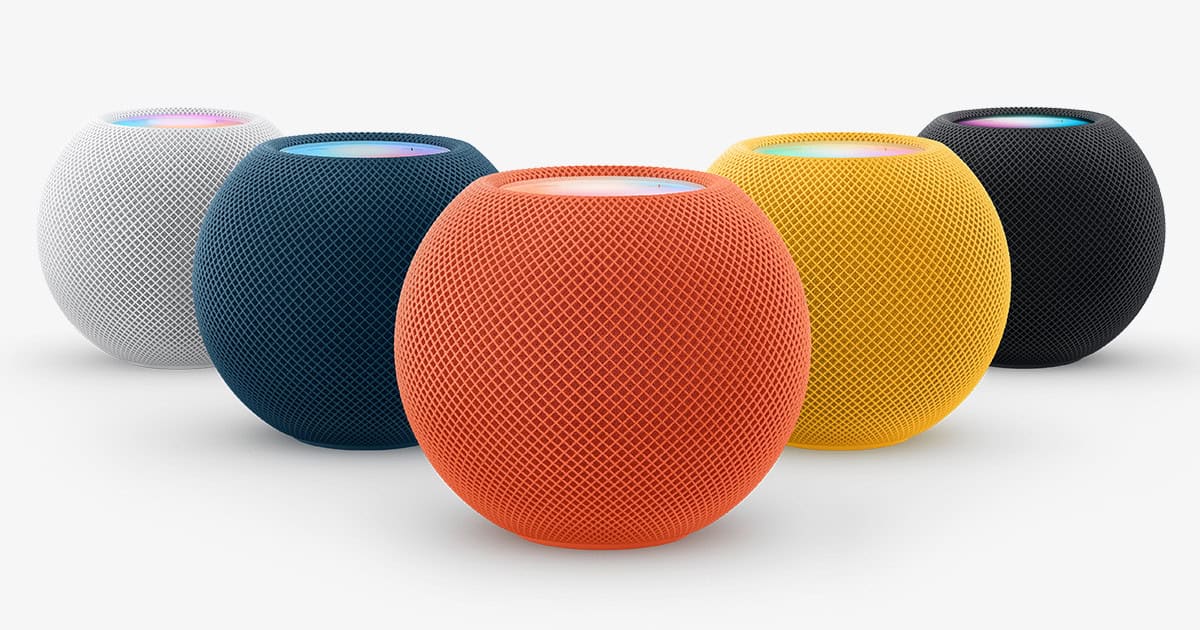
Apple’s smart speaker serves as both an entertainment hub and HomeKit control center. It acts as a home hub for remote access and provides excellent audio quality for music and podcasts.
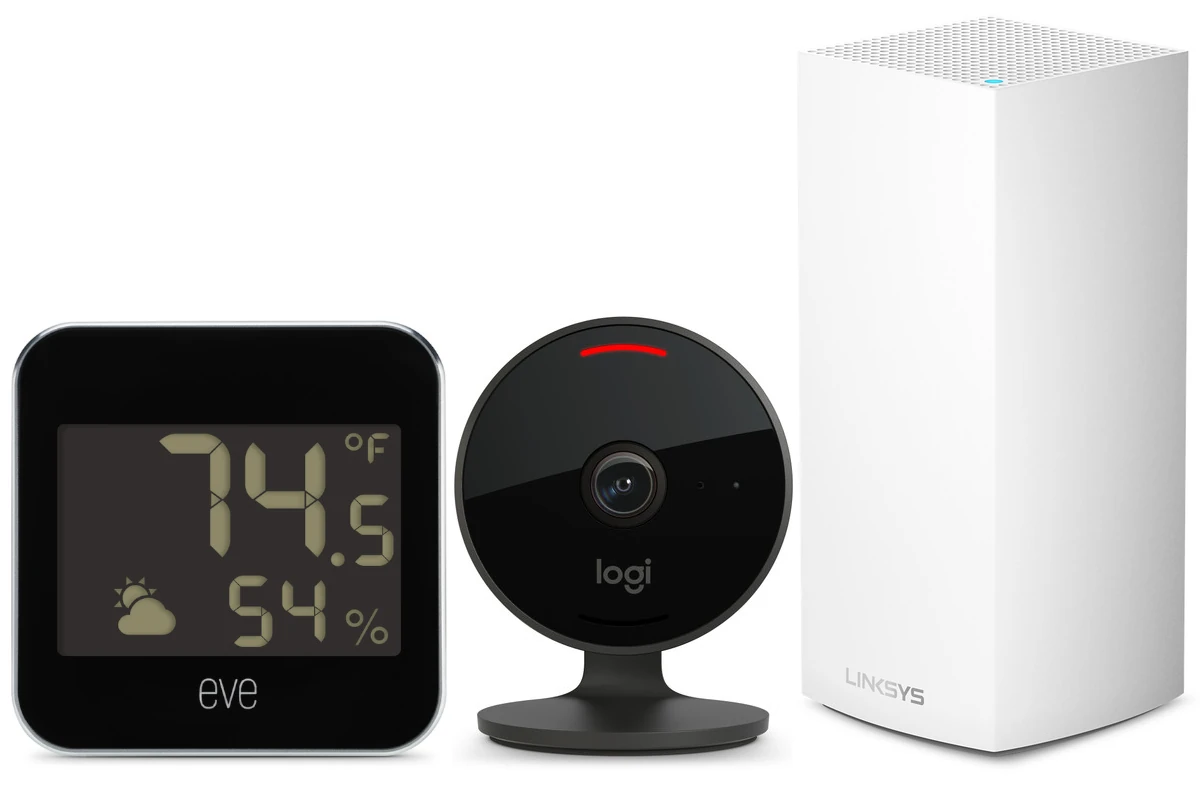
7. Eve Room Indoor Air Quality Monitor
Monitor temperature, humidity, and air quality (VOCs) to maintain a healthy living environment. This device helps you understand and improve your indoor air quality through automated responses.
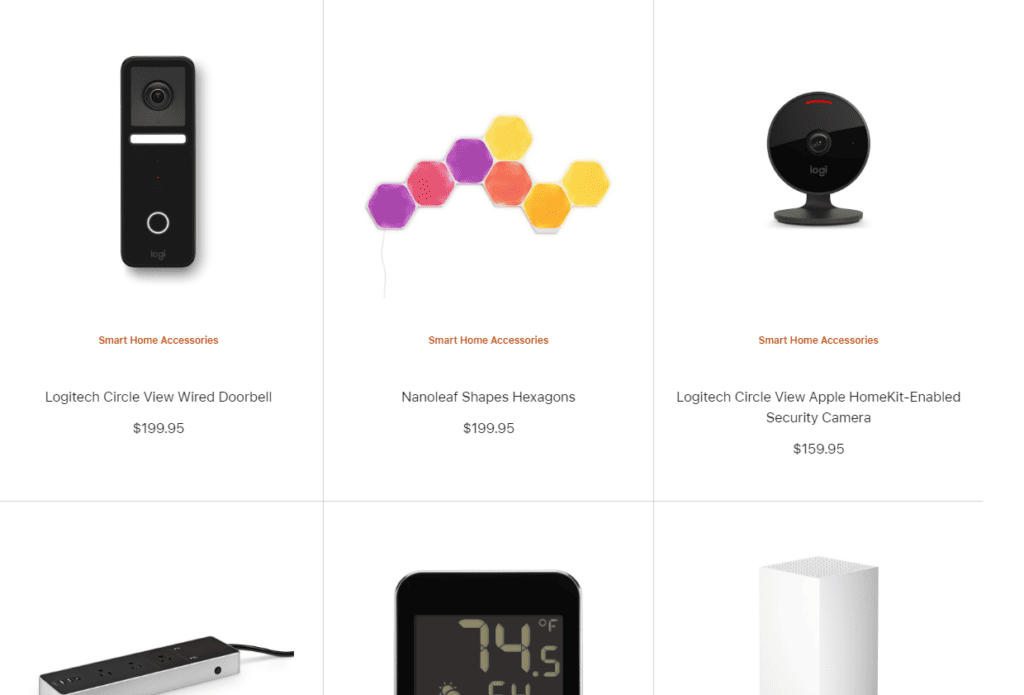
8. Logitech Circle View Doorbell
A HomeKit Secure Video compatible doorbell camera that provides secure, encrypted video storage through iCloud. It offers motion detection, two-way audio, and seamless integration with the Home app.
9. Nanoleaf Light Panels
These modular, geometric light panels create stunning visual displays while serving as functional ambient lighting. They respond to music, can display notifications, and add a modern aesthetic to any room.
10. Eve Weather
Track outdoor conditions including temperature, humidity, and barometric pressure. This weather-resistant device helps inform your HomeKit automations based on real weather conditions.
Comparison Table: Key Features and Pricing
| Device | Primary Function | Connectivity | Approximate Price | Key HomeKit Feature |
|---|---|---|---|---|
| Philips Hue Bulbs | Smart Lighting | Wi-Fi/Zigbee | $15-50 per bulb | Color changing, scheduling |
| Ecobee Smart Thermostat | Climate Control | Wi-Fi | $200-250 | Automated temperature control |
| August Smart Lock Pro | Security/Access | Wi-Fi | $230-280 | Keyless entry, auto-lock |
| Eve Energy Smart Plug | Power Control | Thread/Bluetooth | $40-50 | Energy monitoring, remote control |
| Aqara Door Sensors | Security/Automation | Zigbee | $15-20 each | Trigger-based automations |
| HomePod mini | Hub/Audio | Wi-Fi | $99 | Voice control, home hub |
| Eve Room Monitor | Air Quality | Thread/Bluetooth | $100-120 | Environmental monitoring |
| Circle View Doorbell | Security Camera | Wi-Fi | $200-230 | Secure video, motion alerts |
| Nanoleaf Panels | Decorative Lighting | Wi-Fi | $200-300 (starter kit) | Dynamic lighting effects |
| Eve Weather | Weather Monitoring | Thread/Bluetooth | $70-80 | Outdoor condition tracking |
Getting Started Tips
Start Small: Begin with 2-3 devices like smart bulbs and a smart plug to learn the basics of HomeKit automation.
Plan Your Network: Ensure strong Wi-Fi coverage throughout your home, especially for Wi-Fi-dependent devices.
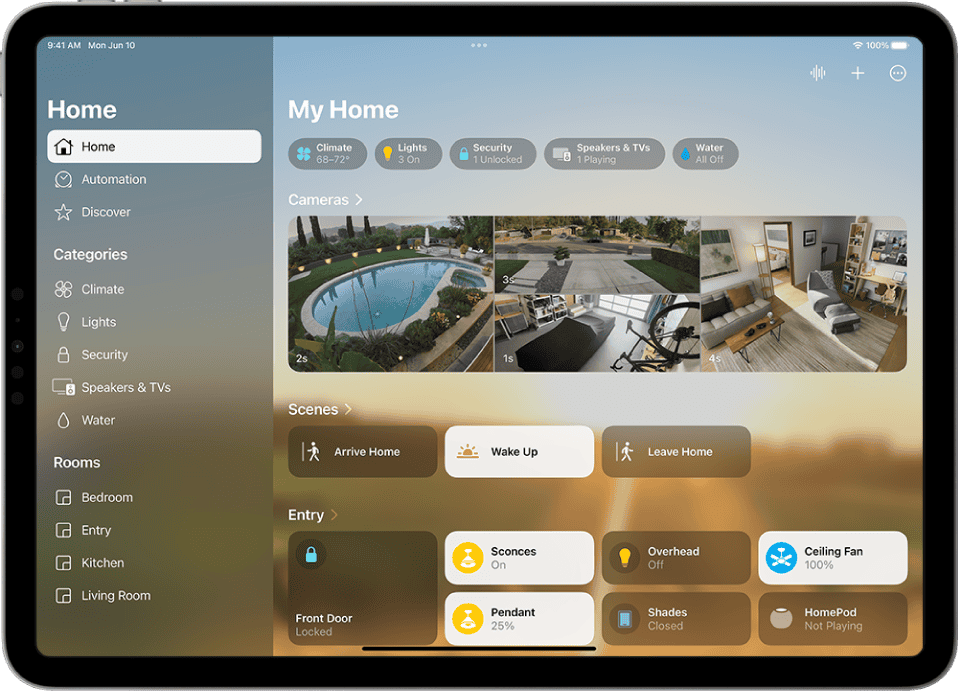
Create Scenes: Use the Home app to create scenes that control multiple devices simultaneously (like “Good Morning” or “Movie Time”).
Set Up Automations: Take advantage of HomeKit’s automation features to make your home truly smart by creating triggers based on time, location, or sensor data.
Consider Thread: Newer devices supporting Thread (like Eve products) offer more reliable connectivity and faster response times.
These 10 HomeKit devices form the backbone of a comprehensive smart home system. By starting with a few key categories—lighting, security, and climate control—you can gradually build a fully automated home that responds intelligently to your needs and preferences. The beauty of HomeKit lies in its seamless integration, allowing all these devices to work together harmoniously through simple voice commands or automated routines.
Building Your Dream Smart Home with Apple HomeKit
Apple HomeKit is changing the way we control our homes. It offers a variety of smart devices that work well together to make our homes more convenient, comfortable, and secure. While it may not be as popular as Google Home or Amazon Alexa, it is a favorite among iOS users. HomeKit is the top choice for people who want to connect their smart devices with their Apple products easily.
The range of HomeKit-compatible devices is expanding, providing a more personalized and controlled smart home experience. HomeKit stands out for its simplicity and seamless integration with iOS devices. Whether you’re installing smart lights or using smart locks to secure your home, HomeKit brings unmatched convenience. As the smart home market grows, more gadgets are becoming compatible with Apple’s ecosystem, making HomeKit a strong contender in the smart home space.
HomeKit Essentials: Smart Speakers and Displays
- Apple HomePod Mini: Compact but powerful, this speaker delivers impressive sound and Siri voice control for smart home commands and music playback.
- Apple HomePod (2nd Gen): This upgraded smart speaker boasts enhanced audio quality, room-sensing technology, and Thread connectivity for seamless smart home integration.
Lighting Up Your Smart Home with HomeKit
- Philips Hue White and Color Ambiance Starter Kit: Get started with smart lighting using this kit, which includes color-changing bulbs and a bridge for easy control and automation.
- Lutron Caseta Wireless Smart Lighting Dimmer Switch Starter Kit: Upgrade your existing switches with these dimmers for effortless control of your lights through the Home app or Siri.
- Nanoleaf Shapes: Combine modular light panels into unique designs and create customizable light shows for ambiance or entertainment.
HomeKit for Comfort and Security
- Eve Energy Smart Plug: Turn any appliance smart with this plug, allowing you to schedule, automate, and control it remotely.
- Ecobee SmartThermostat with Voice Control: Enjoy energy savings and comfort with this smart thermostat that learns your preferences and integrates with voice assistants.
- Schlage Encode Plus Smart WiFi Deadbolt: Secure your home with this keyless lock that offers convenient access through the Home app, Siri, or a keypad.
- Eve Motion Wireless Motion Sensor: Automate lights and other actions based on motion detection for convenience and security.
- Logitech Circle View Camera: Monitor your home with this high-quality camera that works seamlessly with HomeKit Secure Video for privacy and security.
| Device | Category | Key Features |
|---|---|---|
| Apple HomePod Mini | Smart Speaker | Compact, powerful sound, Siri voice control, Thread connectivity |
| Apple HomePod (2nd Gen) | Smart Speaker | Enhanced audio, room-sensing technology, Thread connectivity |
| Philips Hue White and Color Ambiance Starter Kit | Smart Lighting | Color-changing bulbs, bridge for easy control and automation |
| Lutron Caseta Wireless Smart Lighting Dimmer Switch Starter Kit | Smart Switch | Effortless dimming control via Home app or Siri |
| Nanoleaf Shapes | Smart Lighting | Modular light panels for customizable designs and light shows |
| Eve Energy Smart Plug | Smart Plug | Schedule, automate, and control appliances remotely |
| Ecobee SmartThermostat with Voice Control | Smart Thermostat | Energy savings, comfort, voice assistant integration |
| Schlage Encode Plus Smart WiFi Deadbolt | Smart Lock | Keyless access, Home app/Siri/keypad control |
| Eve Motion Wireless Motion Sensor | Motion Sensor | Automate actions based on motion detection |
| Logitech Circle View Camera | Security Camera | High-quality video, HomeKit Secure Video for privacy |
Must-Have Apple HomeKit Devices
| Category | Device | Description | Benefits | Price Range | User Rating |
|---|---|---|---|---|---|
| Smart Speaker | Apple HomePod mini | Compact and affordable smart speaker with Siri integration | Controls smart home devices, plays music, responds to voice commands | $99.00 – $99.99 | 4.54 out of 5 stars |
| Streaming Device | Apple TV 4K (2022) | Streams content in 4K Dolby Vision and HDR, functions as HomeKit hub | Access streaming services, control smart home devices | $149.00 – $152.69 | 4.69 out of 5 stars |
| Smart Lock | Schlage Encode Plus | Keyless entry with fingerprint or code access, HomeKit enabled | Increased security and convenience | $229.99 – $279.99 | 4.4 out of 5 stars |
| Smart Thermostat | Ecobee SmartThermostat | Energy Star certified learning thermostat with room sensors, supports HomeKit | Saves energy, creates comfortable environment | $229.99 – $249.99 | 4.49 out of 5 stars |
| Smart Camera | Eufy Security Solo IndoorCam C24 | Indoor security camera with motion detection and night vision, works with HomeKit | Improves home security and peace of mind | $42.99 | 4.75 out of 5 stars |
| Smart Plug | Wemo WiFi Smart Plug | Controls lights and appliances remotely, functions with HomeKit | Automates routines, saves energy | $29.99 – $39.99 | 4.3 out of 5 stars |
| Light Switch | Lutron Caseta In-Wall Smart Dimmer Switch | Controls lights from app or voice commands, integrates with HomeKit | Sets lighting scenes, creates ambience | $49.95 – $79.95 | 4.6 out of 5 stars |
| Motion Sensor | Eve Motion Sensor | Detects motion and triggers automations, works with HomeKit | Improves security and automates lighting | $39.95 – $49.99 | 4.7 out of 5 stars |
| Smart Air Purifier | Smartmi Air Purifier P1 | Improves indoor air quality, integrates with HomeKit | Maintains a healthy environment | $199.00 – $249.99 | 4.5 out of 5 stars |
| Door & Window Sensor | Aqara Door & Window Sensor | Detects door and window openings, triggers automations, works with HomeKit | Enhances security and monitors home access | $24.99 – $29.99 | 4.2 out of 5 stars |
Key Takeaways
- Apple HomeKit offers a user-friendly, secure, and customizable platform for integrating smart home devices within the Apple ecosystem, enhancing convenience and security for Apple users.
- Key benefits of using Apple HomeKit include easy setup and seamless operation with iOS devices, strong encryption for data security, growing compatibility with a variety of smart devices, and the ability to create scenes for automated device control.
- Top smart lighting solutions for HomeKit users include Philips Hue for its wide product range and ease of use, LIFX bulbs for direct Wi-Fi connectivity and vibrant colors, Eve Energy smart plugs for making traditional lights smart, and Nanoleaf panels for customizable aesthetic lighting.
- To optimize home climate control, it’s essential to choose HomeKit-compatible thermostats such as ecobee3 lite, Emerson Sensi Touch WiFi, and Honeywell Lyric T5+, focusing on features that match personal preferences and energy savings.
- Enhancing home security with HomeKit-compatible devices like smart locks, security cameras, and alarm systems ensures a safer living environment, offering remote control, real-time alerts, and convenient voice commands for peace of mind.
- The future of Apple HomeKit in the smart home ecosystem looks promising with increased device compatibility, a focus on advanced security features, the integration of AI for smarter automation, and continued innovation to meet the evolving needs of consumers.
Benefits of Using Apple HomeKit for Smart Home Devices
Apple HomeKit makes controlling smart home devices fast and simple. If you’re into Apple gadgets, HomeKit is a handy way to make all your stuff work together. Let’s look at why it’s so good for smart homes.
First off, HomeKit is super easy to set up. You usually just scan a code and you’re connected. That means less time messing with settings and more time enjoying your smart home. Plus, it’s designed to work smoothly with iPhones, iPads, and other Apple devices. This seamless connection turns your devices into remote controls for your whole house.
Security is another big plus. Apple pays a lot of attention to keeping things safe and private. With HomeKit, all your data is encrypted, which means it’s turned into a code that only you can unlock. Nobody outside can sneak a peek at your information. This peace of mind is a big reason why people go for HomeKit.
The range of compatible devices is constantly growing. From lights and locks to thermostats and cameras, more gadgets are getting HomeKit support. This gives you a lot of options to customize your smart home just the way you like it.
One of HomeKit’s coolest features is creating scenes. Imagine telling your phone “Goodnight” and having your doors lock, lights turn off, and thermostat adjust all at once. Scenes let you control multiple devices with a single command, making life at home even simpler.
Apple HomeKit offers an easy, secure, and customizable way to manage your smart home. Whether you’re already in the Apple ecosystem or looking to join, HomeKit brings a lot of benefits to the table.
Top Smart Lights Compatible with Apple HomeKit
Smart lights have become a crucial part of creating a modern, connected home. They not only save energy but also offer convenience and a touch of fun to any living space. When it comes to Apple HomeKit, several smart lights stand out for their compatibility, ease of use, and features.
Philips Hue is often the first name that comes to mind. These lights work seamlessly with HomeKit. Users can control them through the Apple Home app or Siri, making it easy to turn lights on and off, dim them, or change colors with just a voice command. Philips Hue offers a wide range of products, including bulbs, light strips, and lamps, that fit any room’s needs.
Another great option is the LIFX line of Wi-Fi smart bulbs. LIFX bulbs are known for their rich colors and high brightness levels. They do not require a hub, connecting directly to your home Wi-Fi and, by extension, to Apple HomeKit. This direct connection simplifies the setup process and reduces clutter.
Eve Energy is a smart plug that allows any lamp with a traditional light bulb to become smart. By plugging a lamp into Eve Energy, users gain the ability to turn it on and off remotely via the Apple Home app. It’s a simple and cost-effective way to make any light smart.
Lastly, the Nanoleaf panels are for those looking to add a bit of flair. These modular light panels can create beautiful, dynamic scenes in any room. They’re perfect for setting the mood or just adding a pop of color. With HomeKit, controlling Nanoleaf panels is straightforward and intuitive.
Each of these options brings something different to the table, but they all share the ability to integrate smoothly with Apple HomeKit. This integration allows for easy control and automation, making managing your home’s lighting simple and enjoyable. Whether you’re looking for basic bulb control or want to create elaborate lighting scenes, there’s a HomeKit-compatible smart light that fits the bill.
Choosing the Right Thermostat for Apple HomeKit
When it comes to making your home smarter, choosing the right thermostat for Apple HomeKit is a key step. Apple HomeKit allows you to control your home’s heating and cooling directly from your iPhone or iPad. This means you can set the temperature, turn it on or off, or schedule heating and cooling times with just a few taps.
First off, look for thermostats that are specifically labeled as compatible with Apple HomeKit. These thermostats will connect easily to your Apple ecosystem, letting you manage your home’s climate from anywhere. They also support voice control through Siri, offering an extra layer of convenience.
There are several brands out there that offer HomeKit-compatible thermostats. Some of the top choices include the ecobee3 lite, the Emerson Sensi Touch WiFi Thermostat, and the Honeywell Lyric T5+. These models vary in features and price, so it’s important to assess what matters most to you. Do you need a model that learns your schedule and adjusts automatically? Or is your priority a thermostat that lets you control air quality and humidity as well as temperature?
Remember, installing a smart thermostat can also help you save money on your energy bills. By optimizing your heating and cooling schedules, these devices ensure you’re not wasting energy when you’re not home. Plus, many offer detailed energy reports to help you understand your consumption patterns better.
Ultimately, the right thermostat for your Apple HomeKit setup depends on your specific needs and preferences. Gaining control over your home’s climate has never been easier or more convenient with these smart devices. As you weigh your options, consider not just the features and price, but also how a thermostat will fit into your daily life and smart home ecosystem.
Enhancing Home Security with Apple HomeKit-Compatible Devices
Keeping your home safe is a top priority. Apple HomeKit-compatible devices make it easier than ever. These gadgets let you control locks, cameras, and alarms from your iPhone or iPad. You don’t need to be a tech whiz. It’s all about making your home secure with a few taps on your screen.
Smart locks are a game-changer. They let you lock and unlock doors from anywhere. If you forget to lock up, no worries. Just use your phone. Some smart locks even let you give temporary keys to visitors. You’ll never have to hide a spare key again.
Security cameras work with HomeKit too. You can check on your home anytime. See who’s at the door or make sure everything’s okay when you’re away. The best part? You get alerts on your phone if there’s unusual activity. It’s like having an extra set of eyes on your home.
Alarm systems have also leveled up. With HomeKit, your alarm system is smarter. It can tell if you’re home or away and adjust itself. If an alarm goes off, you’ll know right away. You can even control it with voice commands. Saying “Hey Siri, arm my security system” feels futuristic.
With Apple HomeKit, your home is not just smart; it’s secure. These devices work together to keep you safe. Whether you’re home or away, peace of mind is just a tap away. And with easy setups, you’ll be up and running in no time.
Future of Apple HomeKit in the Smart Home Ecosystem
Apple HomeKit has made waves in the smart home market. It’s become a key player. Looking ahead, its role is only set to grow. Experts predict more devices will become compatible. This means users will have more control over their homes. They can turn lights on or off, lock doors, and even adjust the thermostat with just a few taps on their iPhone or voice commands to Siri.
The push for better security is a big deal for HomeKit’s future. Apple’s emphasis on privacy and secure communication between devices sets it apart. In the coming years, expect to see even stronger security features. These could include advanced encryption or safer data storage. Apple’s strict privacy standards give many users peace of mind. This is something other platforms can’t always match.
Another exciting development is the integration of artificial intelligence (AI). AI could make HomeKit smarter. Imagine a system that learns your routine. It could turn down your thermostat when you leave for work. Or it could open your blinds to wake you up with natural light. The possibilities are endless. AI can also improve energy efficiency, saving money on utility bills.
The market for smart home devices is getting crowded. Despite this, HomeKit has a solid chance to stand out. Its ease of use, security, and brand loyalty among Apple users are key advantages. The future looks bright for Apple HomeKit in the smart home ecosystem. Its commitment to innovation and user-friendly design will likely attract even more customers.
As technology advances, HomeKit’s compatibility is expanding. From smart fridges to robotic vacuums, users can expect a wider range of HomeKit-supported devices. This brings us closer to fully integrated smart homes.
Conclusion
Apple HomeKit’s trajectory in the smart home sector is undeniably upward, buoyed by its commitment to security, ease of use, and a broadening device ecosystem. Its standout features and Apple’s brand loyalty position it as a pivotal player in the evolution towards more connected and intelligent homes. As technology advances, HomeKit’s role is set to expand, offering users not just control but also unparalleled peace of mind and efficiency in their daily lives. The future looks promising for Apple HomeKit, promising a seamless and secure smart home experience.
Frequently Asked Questions
What is the future of Apple HomeKit in the smart home ecosystem?
Apple HomeKit is expected to play an increasingly significant role in the smart home ecosystem. It emphasizes enhanced security features such as advanced encryption and AI integration, promising improved functionality and energy efficiency. Its ease of use, security measures, and brand loyalty make it a standout choice, with expanding compatibility signaling a move towards fully integrated smart homes.
How does HomeKit stand out among other smart home platforms?
HomeKit stands out due to its exclusive compatibility with Apple devices, offering an easy setup and intuitive control through the Home app. It provides enhanced security features and a seamless integration compared to other platforms, catering particularly to Apple device users and ensuring a streamlined smart home experience.
What are the requirements to use HomeKit?
To use HomeKit, you need an Apple device, such as an iPhone, iPad, or a Mac. HomeKit works in the background to connect and control your smart devices, with interactions managed through the pre-installed Home app on Apple devices.
How do I choose the best HomeKit-compatible devices for my home?
When selecting HomeKit-compatible devices, consider the design, functionality, and how the device fits into your daily routine and home setup. Look for devices that simplify your life and match the conveniences you seek, ensuring they integrate well with your existing smart home ecosystem.
What factors do you consider when testing HomeKit devices?
In testing HomeKit devices, we evaluate ease of setup, performance, and how the device’s features compare relative to its price. We also consider the device’s design, functionality, and how well it integrates with the HomeKit ecosystem, ensuring it delivers on its promises without complicating the user experience.