Applicant Tracking Systems (ATS) have become a vital part of the hiring process, playing a pivotal role in how employers manage and decide on job applications. A reliable ATS checker tool can be a great help for job seekers in optimizing their resumes to pass through these systems successfully. These tools review resumes, suggest improvements, and increase the chances of getting an interview. As job applications continue to shift to digital platforms, understanding and adapting to ATS requirements has become essential.
An ATS checker tool evaluates resumes similarly to how an ATS would during a real job application process. These tools highlight parts of a resume that may need changes, such as specific keywords or phrases, formatting, and relevant skills for a job. By using an ATS checker, one can make data-driven adjustments to their resume, enhancing its effectiveness. Job seekers can use this feedback to adapt their resumes for a better match with the job they aim to land.ATS checker tools also offer additional resources that help users through the job search process. In addition to reviewing resumes, they may provide job application tracking, interview management, and networking optimization. These tools often extend to cover the full scope of career advancement, making them a comprehensive resource for job seekers.
ATS Checker Tools: Ranked
| Rank | ATS Checker Tool | Features | Pros | Cons |
|---|---|---|---|---|
| 1 | Jobscan | Keyword optimization, ATS score, detailed resume analysis | User-friendly, integrates with major job boards, includes cover letter optimization | Premium features can be expensive |
| 2 | Resume Worded | Tailored scoring, unlimited scans, AI-driven feedback | Provides targeted advice, free plan offers useful insights | More advanced features require a paid plan |
| 3 | SkillSyncer | Automated job description analysis, resume comparison | Easy to use, helps match keywords accurately | Free version has limited scans |
| 4 | TopResume | Professional resume reviews, ATS-specific feedback | Access to expert insights, offers LinkedIn profile optimization | Can be pricier for individual users |
| 5 | CV Compiler | Resume formatting check, industry-specific templates | Helps ensure readability, includes helpful guides | Limited customization of feedback |
Important Considerations:
- Free Trials: Many tools offer free trials to test their functionality before commitment.
- Your Needs: Choose the tool whose features best align with your specific requirements and budget.
- Constant Updates: ATS algorithms evolve, so it’s important to use a tool that updates regularly to maintain effectiveness.
Key Takeaways
- ATS checker tools guide job seekers in optimizing resumes.
- These tools compare resumes to actual ATS requirements and suggest specific improvements.
- They also provide additional resources for the entire job application process.
Understanding ATS and Optimizing Your Resume
Crafting a resume that gets noticed by Applicant Tracking Systems (ATS) is crucial in today’s job search. This part of the article sheds light on how the ATS impacts the hiring process and how job seekers can mold their resumes for better visibility and chances of being shortlisted by recruiters.
The Role of Applicant Tracking Systems in the Hiring Process
Applicant Tracking Systems serve as the gatekeeper in many companies’ hiring processes. These systems filter resumes by scanning for specific keywords and criteria set by the recruiter. Only the resumes that rank highly in the ATS have a higher likelihood of reaching human eyes.
Key Elements of an ATS-Friendly Resume
An ATS-friendly resume has certain characteristics that help it stand out. It includes clear formatting, standard fonts, and avoids complex elements like tables or images that confuse the ATS. Key sections should be present: contact information, education, work experience, and skills. Highlighting each header ensures the ATS recognizes all relevant information.
How to Effectively Use Keywords and Content
Keywords in a resume should match those found in the job description. Jobseekers need to include relevant skills, job titles, and commonly used industry terminology to enhance their resume’s visibility. It’s essential to integrate these keywords organically into the content, maintaining a natural flow throughout the document.
Evaluating Your Resume: Tools and Techniques
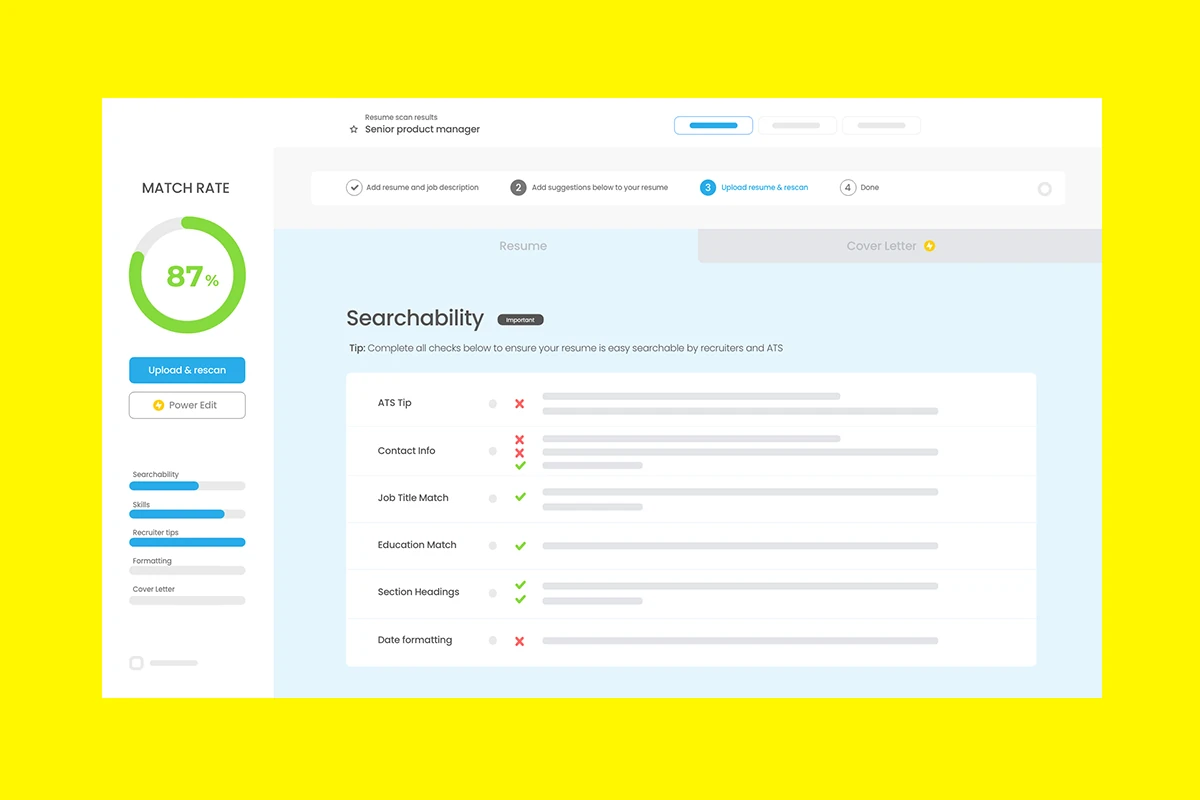
There are various tools and techniques to assess the effectiveness of your resume for ATS. ATS resume checkers like Jobscan and Enhancv provide feedback on a resume’s match rate with job descriptions, suggesting areas for improvement. These tools often require uploading your resume to generate a report that reviews the presence of the needed keywords and formatting best practices.
Supplementary Tools and Considerations for Job Seekers
When applying for jobs, it’s not just about the resume but also the additional tools and practices that can improve your chances of landing an interview.
Leveraging Advanced ATS Checkers and Builders
Using advanced ATS checkers such as Jobscan can help you tailor your resume to meet the criteria of applicant tracking systems. Effective builders like Enhancv offer templates that ensure your resume format is readable by ATS while highlighting key achievements in a structured way.
Important ATS-Friendly Features Beyond the Resume
Job seekers should pay attention to creating an ATS-friendly LinkedIn profile and a compelling cover letter. Both of these should include relevant keywords and a clear display of accomplishments. Ensure the contact information section is up to date with a clean email address and phone number.
Maintaining Privacy and Professionalism
Always maintain privacy by sharing only the necessary contact information. Professionalism extends to ensuring your online job applications through job tracker tools are organized and managed discretely. These tools often provide personalized suggestions for improving your outreach to employers.
Final Checks: Proofreading and Ensuring Compliance
Before submitting, conduct a full spell check and grammar check of all documents, including your resume and cover letter. Scrutinize the job listing again to ensure your application aligns perfectly with the job requirements. Use tools that give you a clear resume score and offer feedback on how to enhance your documents for better ATS compatibility.
Frequently Asked Questions
Navigating the job market successfully often involves understanding how to get past automated filters. These filters, known as Applicant Tracking Systems (ATS), screen resumes before they reach human eyes. Here are some common questions about ATS checker tools, which can help job seekers improve their resumes and increase their chances of getting noticed by employers.
What are the top-rated ATS checker tools available?
Several ATS checker tools have gained high ratings for their effectiveness and user-friendliness. Tools such as Jobscan and Zety have proven helpful in analyzing resumes for ATS compatibility. Such tools compare your resume against job descriptions and offer feedback to enhance your resume’s match rate.
How can one determine which ATS system a particular company employs?
While it’s difficult to know the exact ATS a company uses without insider information, candidates can gather hints from the job listing or the employer’s career webpage. Some companies mention their application process, or you can sometimes tell by the URL when you apply for a job online. Understanding the company’s industry can also give clues, as some ATS systems cater to specific sectors.
What are the best free tools for checking ATS compatibility of a resume?
Various online platforms offer free services to evaluate your resume against ATS algorithms. Free ATS resume checkers include tools provided by Jobscan and Enhancv, which give users preliminary insights on what their resumes lack and how they align with job descriptions, albeit with some limitations on the number of free reviews.
How can individuals check their resume’s ATS score without cost?
Many websites provide a free analysis of resumes to check their ATS score. This usually involves uploading your resume to the platform, which then scans it for the use of relevant keywords, formatting friendliness, and adherence to typical ATS requirements. Free reports often come with suggestions for improvement.
Which ATS resume checker tool is most effective for improving a resume?
The effectiveness of an ATS checker can be measured by the quality and actionable nature of its feedback. Tools like Jobscan excel by not only scoring a resume but also by providing easy-to-understand tips for enhancement, such as optimizing for keywords and recommending design tweaks to improve machine readability.
Are there reputable ATS scoring tools that employers commonly use?
Employers often use established ATS systems like Taleo, Greenhouse, or iCIMS, all of which score resumes based on keyword matching and relevancy. However, employers typically do not disclose their internal scoring practices. Job seekers can use public checker tools, which simulate these systems to gain a sense of how well their resumes might perform in a real application screening process.