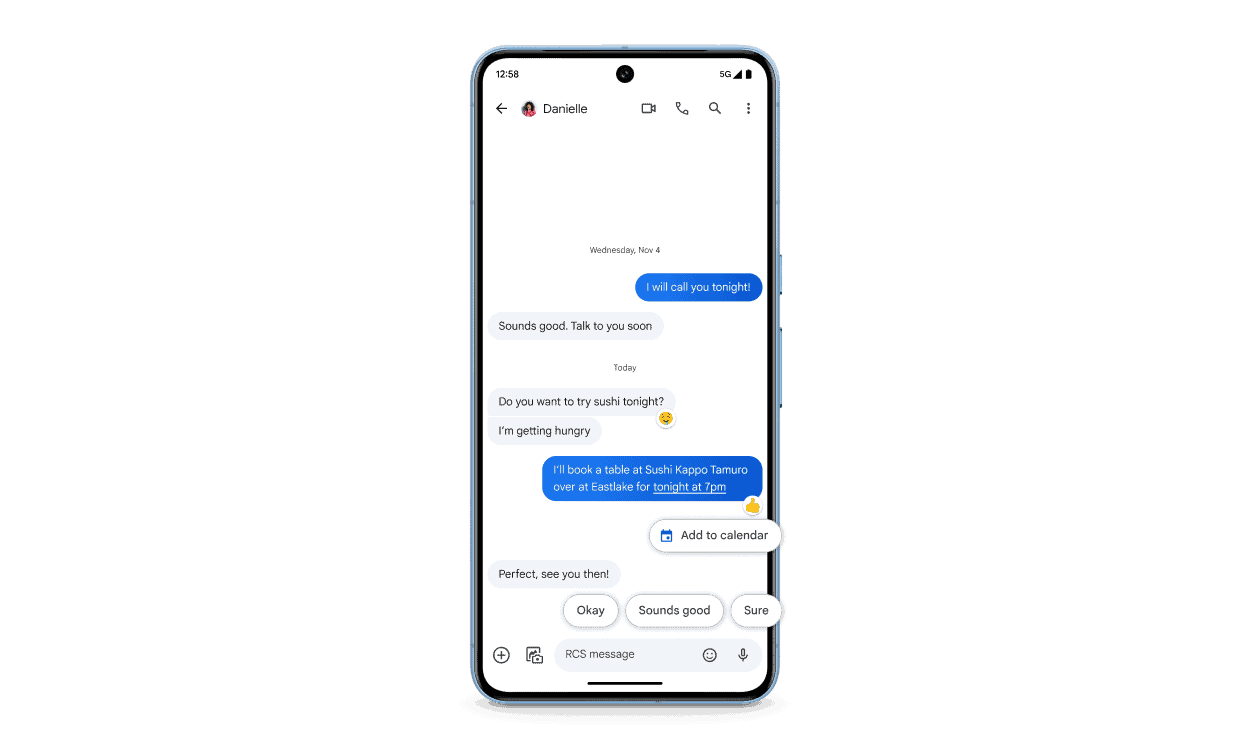
Rich Communication Services (RCS) is the next step in the evolution of mobile messaging, set to replace traditional SMS. Unlike the older system which was limited to text, RCS enhances the messaging experience with features like read receipts, typing indicators, high-resolution photo sharing, and group chat functionalities. This advancement brings texting on par with modern messaging apps and bridges the gap between carrier-based messaging and over-the-top messaging services.
As mobile users worldwide crave more immersive ways to communicate, RCS comes as a welcome upgrade. Implementing it, however, requires network carriers to adopt the standard and integrate it into their services. This transition is crucial for RCS to be universally compatible across devices and carriers, ensuring that no matter who you message, the experience remains consistent. With RCS, messaging becomes a more dynamic and engaging way to stay connected.
The RCS Standard for Texting: Messaging Protocol Explained
Rich Communication Services (RCS) is the next-generation texting protocol designed to replace traditional SMS and MMS messaging on mobile devices. It brings modern features to standard texting, making communication richer and more interactive.
What Is RCS?
- RCS is a communication protocol developed by the GSM Association (GSMA).
- It enhances standard SMS by adding features similar to popular messaging apps like WhatsApp and iMessage.
- Unlike SMS, which is limited to plain text and basic multimedia, RCS supports advanced messaging capabilities.
Key Features of RCS
| Feature | Description |
|---|---|
| Typing Indicators | See when the other person is typing a message. |
| Read Receipts | Know when your message has been read. |
| High-Resolution Media | Send photos and videos in high quality without compression. |
| Group Chats | Create and manage group conversations with enhanced features. |
| File Sharing | Share documents, audio, and other files easily. |
| Location Sharing | Share your real-time location with contacts. |
| Better Security | Supports encryption and improved security over SMS. |
How Does RCS Work?
- RCS messages are sent over the internet (data or Wi-Fi), not through traditional cellular SMS channels.
- It requires both sender and receiver to have RCS-compatible devices and carriers supporting the protocol.
- If RCS is unavailable, messages typically fall back to SMS/MMS automatically.
- Google’s Messages app on Android supports RCS, and Apple has started adopting RCS support for iPhones.
Benefits of RCS Over SMS/MMS
| Aspect | SMS/MMS | RCS |
|---|---|---|
| Message Type | Text only, limited media | Rich media, interactive features |
| Message Length | Limited to 160 characters | No practical limit |
| Group Messaging | Basic group messaging | Enhanced group chat management |
| Delivery Status | No read receipts or typing indicators | Real-time status updates |
| Media Quality | Compressed photos/videos | High-resolution media support |
| Cost | Charged per message by carrier | Uses data, often included in plans |
How to Use RCS
- Android users: Use Google Messages or your carrier’s default messaging app with RCS enabled.
- iPhone users: Apple is gradually integrating RCS support, but iMessage remains the primary messaging protocol.
- Carriers: Many carriers worldwide support RCS, but availability depends on your region and network.
Troubleshooting RCS
- Ensure your messaging app supports RCS and is updated.
- Verify that RCS is enabled in your messaging app settings.
- Confirm your carrier supports RCS services.
- Check internet connectivity (Wi-Fi or mobile data).
- If RCS isn’t working, messages will fallback to SMS/MMS automatically.
Summary
| Topic | Key Points |
|---|---|
| What is RCS? | Next-gen texting protocol replacing SMS/MMS |
| Features | Typing indicators, read receipts, high-quality media |
| How it works | Uses data/Wi-Fi, requires compatible devices and carriers |
| Benefits | Richer messaging, better media, real-time status |
| Usage | Mainly Android, gradually on iPhone |
What is RCS and How Does it Upgrade Your Texting?
RCS stands for Rich Communication Services. It’s a new messaging standard designed to upgrade the outdated SMS (Short Message Service) that’s been around since the early days of cell phones. Think of RCS as the next-generation version of texting.
How Is RCS Different from Traditional Texting?
| Feature | SMS (Standard Texting) | RCS |
|---|---|---|
| Character Limits | Usually limited to 160 characters | Longer messages allowed |
| Multimedia | Supports basic images and videos (often low quality) | Sends high-resolution photos, videos, audio files, GIFs |
| Typing Indicators | Doesn’t show if the other person is typing | See when someone is typing a message |
| Read Receipts | Not always reliable | See when your messages have been read |
| Group Chat Features | Limited features | Enhanced group chats (add/remove people, name the group) |
| Wi-Fi or Data | Relies entirely on cellular connection | Can send messages over Wi-Fi or data |
Benefits of the RCS Standard
- More Interactive: RCS makes texting more engaging and feels more like modern messaging apps.
- Business Applications: Businesses can use RCS for customer support, sending promotions, and even allowing payments.
- No Additional Apps Needed: RCS can be built into your phone’s default messaging app, you don’t need to download anything new.
RCS Availability
RCS is becoming widely available. Many carriers and phone manufacturers support it. Google has been a significant driving force in its adoption, including RCS support in their Google Messages app on Android phones.
Checking for RCS Compatibility
To see if your phone and carrier support RCS, check your messaging app’s settings or contact your carrier directly.
Key Takeaways
- RCS is an upgrade over traditional SMS with features like group chat and media sharing.
- For RCS to work, network carriers must support and implement the standard.
- The transition to RCS promises consistent messaging experiences across devices and carriers.
Developing RCS: The New Communication Standard
Rich Communication Services (RCS) is shaping the future of mobile messaging by offering advanced features over traditional SMS and MMS. This section gives insight into RCS development, analyzing its impact on communication and how it stands to revolutionize texting.
Overview of RCS and Its Evolution
RCS brings modern features to texting. It started as an idea to make standard messaging as powerful as online chat apps. Over time, it has grown to support richer communication.
Comparing RCS with SMS and MMS
RCS is a step beyond SMS and MMS. It offers users the ability to send high-quality photos, see when others are typing, and much more—something SMS and MMS lack.
The Role of Major Tech Companies
Tech giants like Google, Apple, and Samsung have a big role in RCS. They help develop it, make sure it works on their devices and push for its adoption.
Carrier and Industry Support
Mobile carriers, including T-Mobile, Verizon, and AT&T, are vital to RCS. They must support the service and work with the GSM Association to establish it as a universal standard.
Security and Encryption Aspects
Security is crucial in messaging. RCS aims to improve on SMS security, but it’s a work in progress, as end-to-end encryption is still not standard in all RCS implementations.
The Future of Messaging: RCS and AI Integration
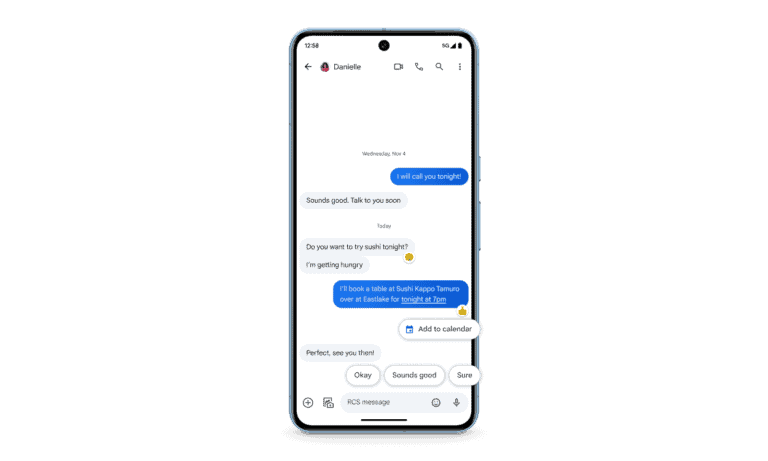
RCS can work with AI to help users with tasks like scheduling. AI can make messaging smarter, and RCS is a platform where this can take off.
Challenges and Limitations
There are challenges to RCS, like getting all companies on board. There’s also the need to update devices and networks to handle the new technology.
Business Communication and RCS
RCS Business Messaging lets companies talk to customers in a more engaging way. They can use rich media and interact directly with their audience.
Enhancing User Interface and Experience
RCS promises to make texting feel like modern chat apps. It has a clean look and features like typing indicators that improve the conversation experience.
Advanced Messaging Features
RCS is packed with advanced features like group chats, video calls, and high-resolution image sharing that make it similar to popular messaging apps.
Infrastructure and Adaptation
For RCS to work, telecoms need the right infrastructure. This is the technical backbone that makes RCS possible on a large scale.
Global Adoption and Mobile Operator Strategies
RCS needs global adoption to be a success. Mobile operators around the world are creating strategies to make RCS the new universal standard.
Metrics and Analytics in RCS
Companies can use RCS to get data on how people talk to their brand. This can help them learn and improve their services.
Addressing Privacy Concerns
Privacy is big with RCS. The service must protect user data and ensure that people feel safe using it for their private conversations.
RCS for Personal Use Versus Business
RCS is not only for chatting with friends. It’s also a powerful tool for businesses to connect with customers directly on their phones.
Implementing RCS Technology
Rich Communication Services (RCS) is transforming how people text. Here’s a detailed guide on implementing RCS technology effectively.
Preparation for RCS Rollout
The first step for mobile operators is to set clear goals for RCS. They must ensure their network is ready to support the service. It involves planning and adapting the existing infrastructure to handle RCS features smoothly.
Technical Setup and Platforms
For RCS to function, one needs the IP Multimedia Subsystem (IMS) at the core. Telecom providers must integrate IMS with their network. They should also ensure support across devices such as Android phones, tablets, and, eventually, iOS devices.
Engaging Customers through RCS
Once implemented, RCS adds value to business communication. Companies can engage customers with features like reactions and suggested replies. This approach improves customer support.
Data Sharing and Privacy Management
With RCS, users can share videos, images, and files. Providers must apply end-to-end encryption to secure these data transfers. They should also manage privacy settings transparently.
Interactive and Multimedia Capabilities
RCS allows sending GIFs, carousels, and rich media. It enriches conversations beyond simple text. Users can express themselves in more colorful and meaningful ways.
Integration with Other Messaging Services
RCS is not an isolated platform. It should work with services like WhatsApp, iMessage, and Facebook Messenger. This compatibility ensures users can switch seamlessly between their preferred apps.
Service Providers and Universal Adoption
Key telecom players like T-Mobile, Verizon, and AT&T are crucial for RCS adoption. They must work together for a universal standard. This way, every user gets the same rich messaging experience.
IP Multimedia Subsystem: The Core of RCS
The IP Multimedia Subsystem (IMS) is vital for RCS. It enables Wi-Fi calling and richer communication protocols. Mobile operators must prioritize a robust IMS for their RCS strategy.
RCS and the Transition from Traditional Calling
As RCS takes hold, phone calls become part of a unified communication suite. This shift allows businesses and individuals to conduct transactions or share data in real-time during calls.
Expanding RCS Beyond Messaging
RCS isn’t just about sending texts. It opens doors to a range of services, from branding with logos to customer experience improvements. Businesses can use it to boost sales and provide a tailored service.
Cross-Platform Compatibility
For RCS to reach its potential, it must work across all devices. It includes Android phones, iPhones, and tablets. Compatibility ensures users have a consistent experience, regardless of their device.
Promoting RCS: The Marketing Aspect
Mobile carriers and smartphone manufacturers must promote RCS’s benefits. This promotion will help users understand its advantages over traditional texting. They should showcase real-world examples of RCS at work to highlight its practicality.
Frequently Asked Questions
This section aims to answer common queries about Rich Communication Services (RCS), highlighting its benefits and features.
What are the advantages of using RCS over traditional SMS?
RCS provides a richer chatting experience with features such as read receipts, typing indicators, and the ability to send high-resolution images and videos. Users benefit from an enhanced interface that allows for better group chat capabilities and more interactive messaging.
How can RCS improve communication for businesses?
Businesses can leverage RCS to send richer content to customers, like interactive media, flight check-in cards, and shopping experiences within a text. This leads to more engaging communication and can improve customer service.
Is RCS messaging supported by all mobile carriers?
Not all carriers currently support RCS. However, its adoption is growing, with more carriers coming on board to provide this advanced messaging standard. Users should check with their specific carrier for availability.
Can RCS functionality be disabled, and if so, how?
Yes, RCS functionality can usually be turned off within the messaging app’s settings. Users can look for chat features or similar options to adjust their RCS preferences.
What security features does RCS provide for text messaging?
RCS messaging enhances security with features like end-to-end encryption for one-on-one conversations. This ensures that messages are only readable by the sender and recipient.
How does RCS handle multimedia content compared to standard messaging services?
RCS allows for sending and receiving higher quality multimedia content such as images, GIFs, videos, and audio messages. It handles them in a way that maintains their quality, unlike SMS or MMS, which often compresses media.