AMD Ryzen CPUs rely on software to unleash their full potential. Key among these is the AMD Ryzen Master Utility, which allows users to adjust performance settings and monitor system parameters for optimal performance. This software also supports overclocking, a method used to push a processor beyond its standard speeds. Additionally, AMD provides other software tools for tasks such as system monitoring, rendering, and graphics support. In summary, having the right software and tools can help users get the most out of AMD’s Ryzen CPUs.
You can read up and download the Ryzen Master Utility here: https://www.amd.com/en/products/software/ryzen-master.html
Power Up Your Ryzen CPU: A Guide to Essential Software and Tools
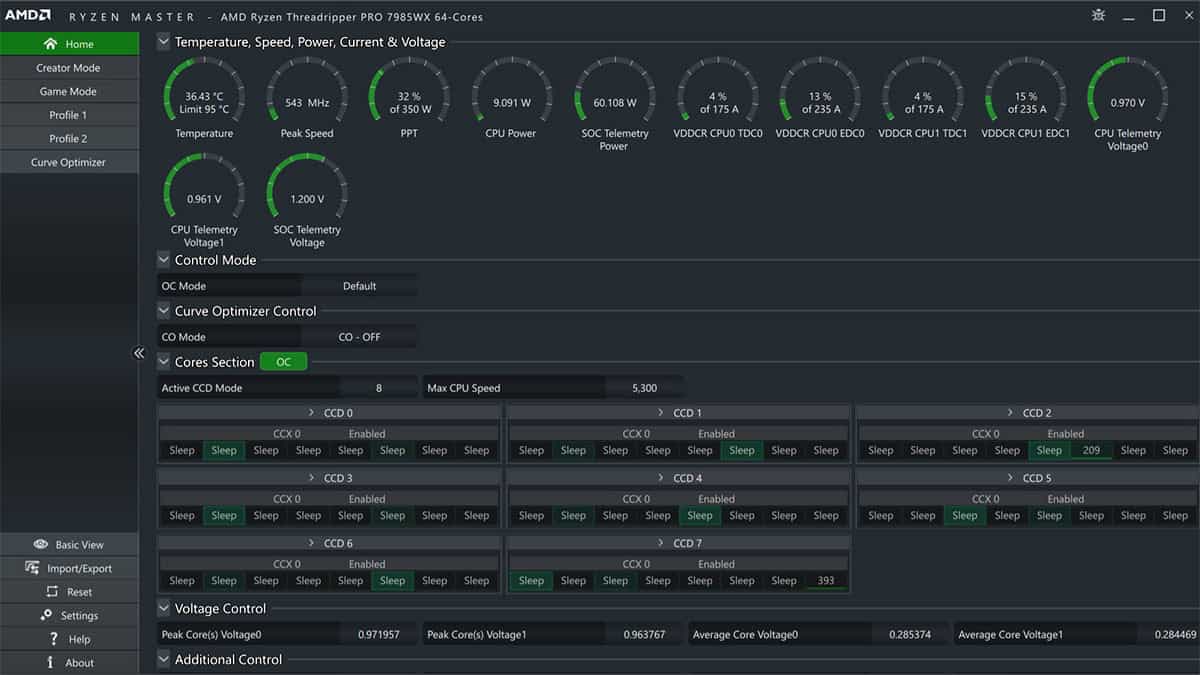
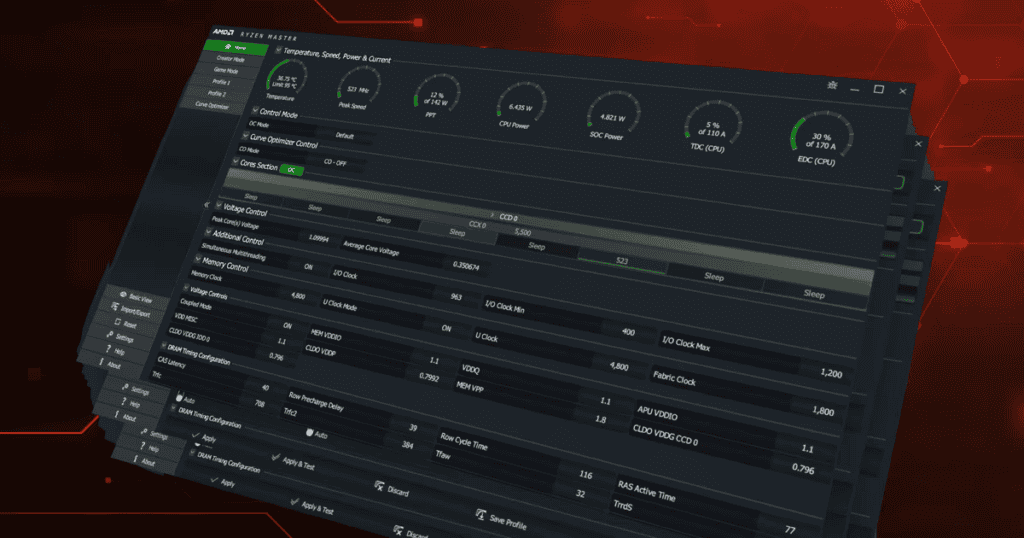
AMD Ryzen Master Utility is AMD’s official software for monitoring, tuning, and overclocking Ryzen CPUs. It gives users real‑time control over CPU performance, allowing adjustments to clock speeds, voltages, and memory settings—all from within Windows.
This guide explains what Ryzen Master does, how it works, and when you should (or shouldn’t) use it.
What Is AMD Ryzen Master Utility?
AMD Ryzen Master is a free Windows‑based performance tuning tool designed for:
- AMD Ryzen desktop processors
- AMD Ryzen Threadripper CPUs
It provides a user‑friendly interface for overclocking that previously required BIOS access.
Ryzen Master is not supported on macOS or Linux.
Key Features of AMD Ryzen Master
1. CPU Overclocking
Ryzen Master lets you:
- Increase CPU clock speeds
- Adjust CPU voltage
- Overclock individual cores (on supported CPUs)
- Apply Precision Boost Overdrive (PBO)
Changes can be applied instantly without rebooting.
2. Real‑Time Monitoring
The utility displays:
- CPU temperature
- Core voltage
- Clock speeds per core
- Power usage
- Memory performance
This helps you monitor stability and thermals while tuning.
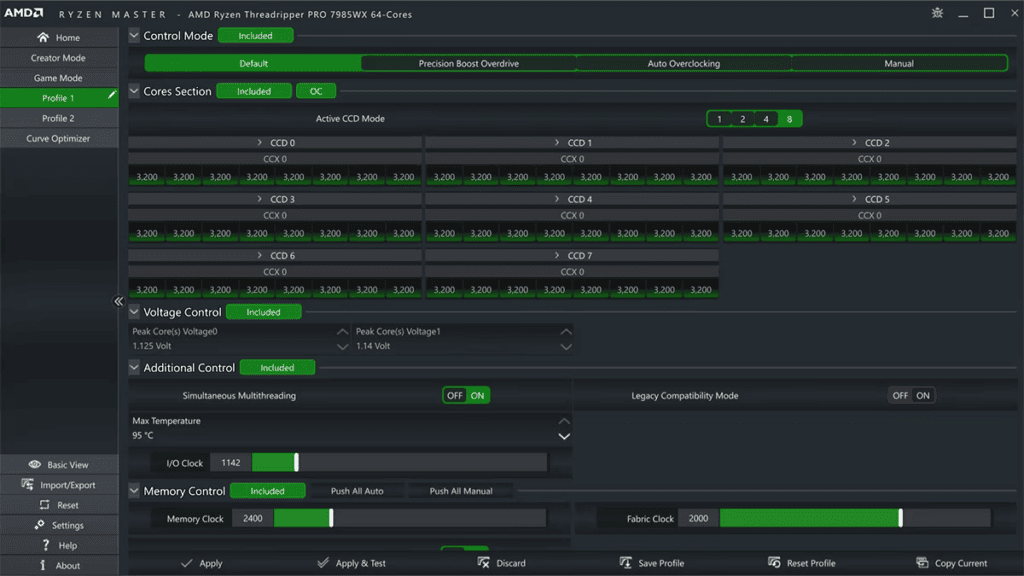
3. Profile‑Based Tuning
You can create and save multiple profiles:
- One for gaming
- One for productivity
- One for power efficiency
Profiles can be switched quickly without entering the BIOS.
4. Precision Boost Overdrive (PBO)
Instead of manual overclocking, Ryzen Master supports:
- Automatic performance boosting
- Dynamic adjustment based on cooling and power limits
PBO is safer and recommended for most users.
5. Memory Control (Limited)
Ryzen Master provides:
- Memory frequency adjustments
- Basic timing controls (varies by CPU and chipset)
Advanced memory tuning is usually better done in BIOS.
Supported CPUs and Systems
Ryzen Master supports:
- AMD Ryzen desktop CPUs
- Ryzen Threadripper processors
- Windows 10 and Windows 11 (64‑bit)
Not supported:
- Laptops and mobile Ryzen CPUs
- Older AMD FX processors
- Non‑AMD CPUs
How to Use AMD Ryzen Master
Step 1: Download and Install
- Download Ryzen Master from AMD’s official website
- Install and restart your PC
- Launch the application as an administrator
Step 2: Choose a Mode
- Basic Mode: Simple monitoring
- Advanced Mode: Full control and tuning options
Step 3: Adjust Settings
You can:
- Enable Precision Boost Overdrive
- Set manual CPU clock speeds
- Adjust voltage carefully
- Modify memory frequency
Always make small changes and test stability.
Step 4: Apply and Test
- Click Apply & Test
- Run stress tests or benchmarks
- Monitor temperatures and system stability
If the system becomes unstable, revert to default settings.
Is Ryzen Master Safe?
Ryzen Master is safe when used responsibly, but overclocking carries risks:
- Increased heat output
- Higher power consumption
- Potential system instability
- Reduced CPU lifespan if pushed too far
AMD does not cover damage caused by overclocking under standard warranty.
Ryzen Master vs BIOS Overclocking
| Feature | Ryzen Master | BIOS |
|---|---|---|
| Ease of use | High | Medium |
| Real‑time changes | Yes | No |
| Requires reboot | No | Yes |
| Stability | Good | Excellent |
| Advanced tuning | Limited | Full |
For beginners, Ryzen Master is often the better starting point.
Common Issues and Fixes
Ryzen Master Won’t Open
- Run as administrator
- Update chipset drivers
- Disable conflicting monitoring tools
Changes Don’t Apply
- Check BIOS settings
- Ensure overclocking is enabled
- Update Ryzen Master to the latest version
Who Should Use AMD Ryzen Master?
Ideal for:
- PC enthusiasts
- Gamers looking for extra performance
- Beginners wanting safe overclocking tools
Not recommended for:
- Laptop users
- Mission‑critical systems
- Users without proper cooling
Final Thoughts
AMD Ryzen Master Utility is a powerful and accessible tool for unlocking extra performance from Ryzen CPUs. With real‑time monitoring, profile‑based tuning, and Precision Boost Overdrive, it offers a safe entry point into CPU overclocking.
If you want better performance without diving deep into BIOS settings, Ryzen Master is one of the best tools available.
AMD Ryzen Master: Unleash Your Processor’s Potential
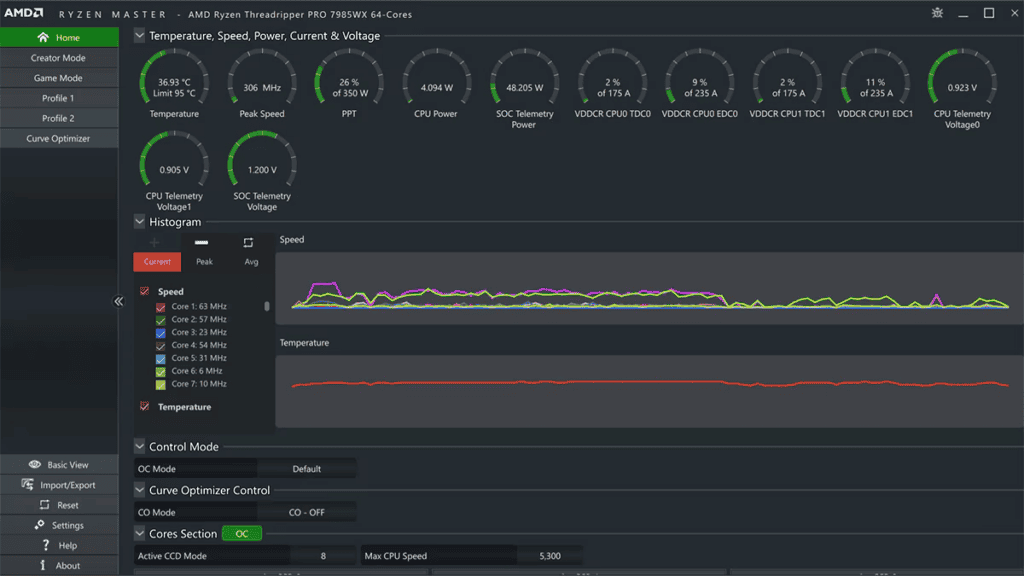
AMD Ryzen Master is a powerful utility for overclocking and monitoring your Ryzen CPU. It allows you to adjust clock speeds, voltages, and fan curves to squeeze out the maximum performance from your processor. The software also provides real-time monitoring of CPU temperatures, voltages, and frequencies, allowing you to keep a close eye on your system’s health.
AMD Chipset Drivers: The Foundation for Optimal Performance
Installing the latest AMD chipset drivers is essential for ensuring that your Ryzen CPU and motherboard work together seamlessly. These drivers provide the necessary software interface for the chipset to communicate with your CPU, enabling features like Precision Boost Overdrive and Ryzen Master to function correctly. Regularly updating your chipset drivers can also improve system stability and performance.
AMD StoreMI: Accelerate Your Storage with Intelligent Caching
AMD StoreMI is a software solution that combines the speed of an SSD with the capacity of a hard drive. It intelligently caches frequently used data on the SSD, allowing for faster boot times, application launches, and file access. StoreMI is a great way to improve the overall responsiveness of your system without having to replace your entire storage setup.
Other Useful Software: Enhance Your Ryzen Experience
| Software | Description |
|---|---|
| HWiNFO64 | A comprehensive system information and diagnostic tool that provides detailed hardware information. |
| CPU-Z | A lightweight tool that displays information about your CPU, motherboard, memory, and graphics card. |
| Cinebench R23 | A popular benchmark for measuring CPU rendering performance. |
| 3DMark | A suite of benchmarks for testing the performance of your system’s graphics card and CPU. |
A Note on BIOS Updates: Stay Up-to-Date for the Latest Features and Fixes
Your motherboard’s BIOS (Basic Input/Output System) controls many of the essential functions of your Ryzen CPU. Keeping your BIOS updated is crucial for ensuring that your system is running at its best and taking advantage of the latest features and security updates. Check your motherboard manufacturer’s website for instructions on how to update your BIOS.
Key Takeaways
- AMD Ryzen Master Utility enables optimization and monitoring of Ryzen CPU settings.
- Overclocking support enhances processor performance beyond standard specifications.
- The AMD software ecosystem provides an extensive range of tools for system enhancement.
Understanding AMD Ryzen CPU Software
Before diving into the specifics, it’s important to note that AMD Ryzen CPU software is a key component in optimizing performance and compatibility with various hardware. This software includes not only the Ryzen Master utility but also essential BIOS updates and chipset drivers for the smooth operation of the AMD CPUs.
Architecture of AMD Ryzen
AMD’s Ryzen CPUs are built on a modular architecture known as “Zen,” which provides efficiency and computing power. Each generation of Ryzen CPUs aims to improve upon the last, with refinements often leading to faster performance and better energy efficiency. When discussing software for these CPUs, understanding that the design directly affects how the software will interact with the hardware is crucial.
AMD Ryzen Master Utility
AMD Ryzen Master is an overclocking utility that allows users to optimize the performance of their Ryzen CPU. With this tool, you can adjust clock speeds, voltages, and other parameters to enhance your system’s performance. The utility presents a “Basic View” that offers access to essential overclocking features, making it more user-friendly for those new to overclocking.
BIOS and Chipset Drivers
The BIOS (Basic Input/Output System) and chipset drivers are critical in ensuring that the operating system and software can communicate effectively with the CPU and other hardware components. Regular updates to the BIOS can resolve compatibility issues and improve stability. For Ryzen CPUs, motherboard manufacturers provide BIOS updates that can be found on their respective websites. These updates are especially important for new CPU support or when using advanced features such as PCIe 4.0 on X570 and B550 chipsets. Similarly, keeping chipset drivers up to date, which can be downloaded from AMD’s support page, ensures that the best performance and stability are squeezed out of the system’s hardware.
Optimizing Ryzen Performance
To get the most out of your AMD Ryzen CPU, fine-tuning its settings through overclocking, system monitoring, and tweaking advanced configurations can significantly enhance its speed and efficiency.
Overclocking and Precision Boost Overdrive
Overclocking is a technique where you manually increase the CPU’s clock speed beyond the factory-set rate. For AMD’s Ryzen processors, this process is made accessible through the Ryzen Master utility. Here, users can create up to four custom profiles to manage the CPU’s active cores, integrated graphics frequencies, and even DDR4 memory timings for optimized performance.
Precision Boost Overdrive (PBO), on the other hand, is an automated overclocking tool that pushes the speed of your Ryzen CPU and Radeon Graphics Card beyond their default limits while staying within warranty terms. It blends the parameters of the CPU’s power delivery network, which are PPT (Package Power Tracking), TDC (Thermal Design Current), and EDC (Electrical Design Current), with the quality of the silicon to boost performance. When utilizing PBO, it’s essential to monitor CPU temperature since higher performance can lead to increased heat output.
Monitoring and Benchmarking
Keeping an eye on the CPU’s health is as crucial as pushing it to faster speeds. System monitoring software offers real-time data on temperature, voltage, and clock speeds, enabling you to ensure the CPU operates within safe limits. Benchmarking applications like Cinebench R23 can measure the improvements in performance after overclocking, providing a quantitative baseline to compare your CPU’s performance against similar systems.
Advanced Configuration Options
Within the Ryzen Master utility, advanced users can find a host of configuration options. One useful feature for fine-tuning overclocks is Voltage Control, which allows users to adjust the CPU voltage. This should be carried out with care, as the guideline is to keep Ryzen CPU voltage below 1.35 volts to prevent lifespan reduction. Additionally, the Memory Control section offers timing adjustments for RAM, which can be crucial for getting the maximum speed out of your system’s memory.
For those who have won the silicon lottery with a more capable chip, the Curve Optimizer feature enables per-core voltage and speed adjustments to refine the overclock further. However, cooling solutions like a robust CPU cooler become even more vital when pushing these boundaries to manage any additional heat generated.
Frequently Asked Questions
When it comes to managing and optimizing AMD Ryzen CPUs, there are a host of tools provided by AMD. The following are common queries that many users have regarding the use of these tools and software.
How can I download the AMD Ryzen CPU software?
To get AMD CPU software, visit AMD’s official website and go to the ‘Support’ tab where you can find the drivers and software section. From there, select your CPU model and the site will direct you to the appropriate download links.
What is AMD Ryzen Master, and where can I get it?
AMD Ryzen Master is a tool for tuning and monitoring your AMD Ryzen CPU. You can download it from the AMD website, where it’s located under the ‘Utilities’ or ‘Drivers & Support’ section for Ryzen processors.
How do I update my existing AMD CPU software?
Keep your AMD CPU software current by downloading the latest updates from the AMD website. First, identify your CPU model, then download the appropriate software package, and follow the instructions provided during the installation.
Are there specific drivers required for AMD Ryzen CPUs?
Yes, AMD Ryzen CPUs work best with drivers that are specifically made for them. These can be found on the AMD website in the ‘Drivers & Support’ section after selecting your specific CPU model.
Where can I find software support for an AMD Ryzen 5 processor?
Software support for the Ryzen 5 processor is available on the AMD website. Navigate to ‘Drivers & Support,’ select your specific Ryzen 5 model, and download the necessary software and drivers.
What software is recommended for monitoring AMD processor performance?
AMD Ryzen Master is the recommended utility for monitoring the performance of Ryzen CPUs. It allows you to track various metrics and adjust settings to optimize your system’s performance.