The Xbox 360 Kinect changed the way we play video games with its controller-free experience and motion-sensing technology. It received mixed reviews, with some praising its innovative gameplay and others noting its limitations. Both gamers and tech enthusiasts were interested in its potential for a more immersive and interactive experience. Even though it was eventually discontinued, the Kinect remains an important part of gaming history, pushing the boundaries of innovation and making a lasting impact on the industry.
As time has passed, consumer feedback and expert reviews have provided a clearer understanding of the Kinect’s performance. This is valuable for anyone thinking about buying the Kinect or curious about its place in gaming history. The variety of available games and how well they utilize the hardware’s capabilities also contribute to the Kinect experience.
Controller-Free Gaming: A Look Back at the Xbox 360 Kinect
When Microsoft launched the Xbox 360 Kinect, it promised a radical shift in how players interact with games—no controller required. Using motion tracking, depth sensing, and voice recognition, Kinect aimed to turn the player’s body into the controller. While the device sparked massive initial interest and strong sales, opinions on its real-world performance have remained mixed. This guide offers an in-depth analysis of the Xbox 360 Kinect, covering its technology, gameplay experience, strengths, weaknesses, and lasting impact.
What Is Xbox 360 Kinect?
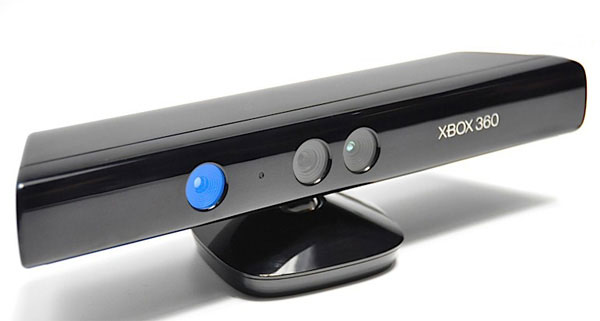
Kinect is a motion-sensing accessory for the Xbox 360 that uses a combination of:
- RGB camera
- Infrared depth sensor
- Multi-array microphones
Together, these components allow Kinect to track full-body movement, facial expressions, and voice commands without the need for physical controllers.
Released in 2010, Kinect quickly became one of the fastest-selling consumer electronics devices in history, driven largely by its appeal to casual and family gamers.
Setup and Ease of Use
Installation Process
Setting up Kinect is straightforward:
- Plug the Kinect sensor into the Xbox 360
- Position it above or below the TV
- Calibrate for room size and lighting
The system guides users through a simple setup, making it accessible even to non-technical users.
Space Requirements
Kinect performs best when:
- Players stand 6–8 feet from the sensor
- There is adequate lighting
- The room has enough open space for full-body movement
Smaller rooms can limit tracking accuracy, especially for games requiring wide gestures.
Motion Tracking Performance
Accuracy and Responsiveness
Kinect’s full-body tracking was impressive for its time, especially in:
- Dance games
- Fitness titles
- Sports mini-games
However, accuracy varies by game quality. Well-optimized titles track movements smoothly, while others suffer from lag, misinterpreted gestures, or delayed responses.
Limitations
- Struggles with fast or subtle movements
- Occasionally loses track of limbs
- Less precise than controller-based input for competitive gameplay
These limitations made Kinect less suitable for traditional action or shooter games.
Voice Recognition and UI Navigation
Kinect introduced hands-free system navigation using voice commands such as:
- “Xbox, pause”
- “Xbox, play”
- “Xbox, go home”
While innovative, voice recognition works best in quiet environments. Background noise, accents, or multiple people speaking can reduce reliability.
Still, for media playback and casual use, voice control added convenience and novelty.
Game Library and Software Support
Best Kinect Games
Kinect excelled in genres focused on movement:
- Dance Central
- Kinect Sports
- Just Dance
- Your Shape: Fitness Evolved
These titles delivered accurate tracking, intuitive controls, and strong social appeal.
Core Gaming Shortcomings
Hardcore gamers often found Kinect games:
- Shallow in mechanics
- Repetitive
- Lacking depth compared to controller-based titles
Few traditional franchises successfully integrated Kinect in meaningful ways.
Fitness and Family Gaming Experience
Kinect truly shines in:
- Fitness routines
- Party games
- Family-friendly experiences
It encourages physical activity, making it popular for home workouts and group play. Its accessibility makes it easy for children, parents, and non-gamers to participate.
Technical and Practical Drawbacks
Despite its innovation, Kinect has notable downsides:
- Requires significant play space
- Performance affected by lighting conditions
- Limited long-term support as Microsoft shifted focus away from Kinect
Additionally, some users expressed privacy concerns due to the always-on camera and microphone.
Long-Term Value and Legacy
Although Kinect never fully replaced traditional controllers, it left a lasting impact on gaming and motion-sensing technology. Its innovations influenced:
- Motion tracking in VR systems
- Gesture recognition research
- Accessibility features in gaming
Today, Kinect remains relevant for retro gamers, fitness enthusiasts, and collectors interested in experimental gaming hardware.
Final Verdict: Is Xbox 360 Kinect Worth It?
Pros
- Innovative controller-free gameplay
- Excellent fitness and dance games
- Great for families and casual gamers
Cons
- Inconsistent tracking in some games
- Requires space and ideal lighting
- Limited appeal for hardcore gamers
Overall Rating: ★★★★☆ (4/5 for casual and family gaming)
The Xbox 360 Kinect may not have revolutionized gaming as promised, but it delivered a unique, engaging experience that still holds charm today. For players seeking active, social, and motion-based entertainment, Kinect remains a memorable and worthwhile part of gaming history.
What is the Xbox 360 Kinect?
The Kinect was a motion-sensing device for the Xbox 360. It let you play games and control the console using your body and voice, without the need for controllers. Think of it like a super advanced webcam that could see you move and hear you speak. It was launched in 2010 and promised a whole new way to play.
How Did Kinect Work?
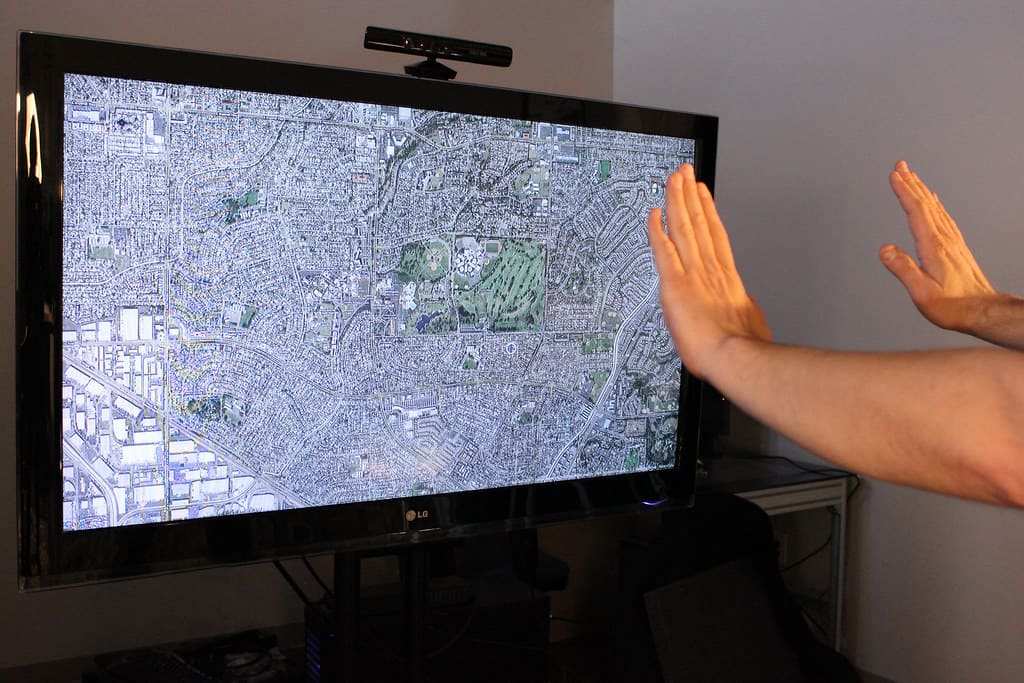
Kinect used a combination of cameras, sensors, and microphones to track your body movements and voice commands. It could recognize gestures, track your body in 3D space, and even understand your voice. This allowed you to play games by jumping, dancing, or even just talking to the console.
Top Kinect Games: From Dance Central to Kinect Adventures
| Game Title | Genre | Key Features |
|---|---|---|
| Dance Central | Dance/Rhythm | Choreographed dances, full-body tracking, multiplayer |
| Kinect Adventures | Party/Minigames | River rafting, obstacle courses, mine cart rides – all using body movements |
| Kinect Sports | Sports | Bowling, track and field, boxing, and more – all without controllers |
| Your Shape Fitness Evolved 2012 | Fitness | Personalized workouts, virtual trainers, progress tracking |
| Fruit Ninja Kinect | Arcade/Action | Slice fruit with your hands in a fun and addictive game |
| Child of Eden | Rail shooter | Control a spaceship using your body to blast enemies |
| Gunstringer | Action-adventure | Puppet-based western shooter with unique Kinect controls |
Pros and Cons of the Kinect
| Pros | Cons |
|---|---|
| Controller-free gaming experience | Required a lot of space for accurate tracking |
| Intuitive and engaging for all ages | Limited selection of high-quality games |
| Innovative technology with potential for diverse applications | Some games suffered from accuracy and responsiveness issues |
| Accessibility features for players with disabilities | High price point compared to traditional controller-based games |
The Legacy of the Kinect
While the Kinect faced some challenges, it was a groundbreaking technology that paved the way for future motion-controlled gaming and virtual reality experiences. Its legacy lives on in various forms, influencing the development of motion-tracking technology in gaming and other fields. The Kinect remains a memorable chapter in the history of gaming, offering a glimpse into a future where we interact with technology in more natural and intuitive ways.
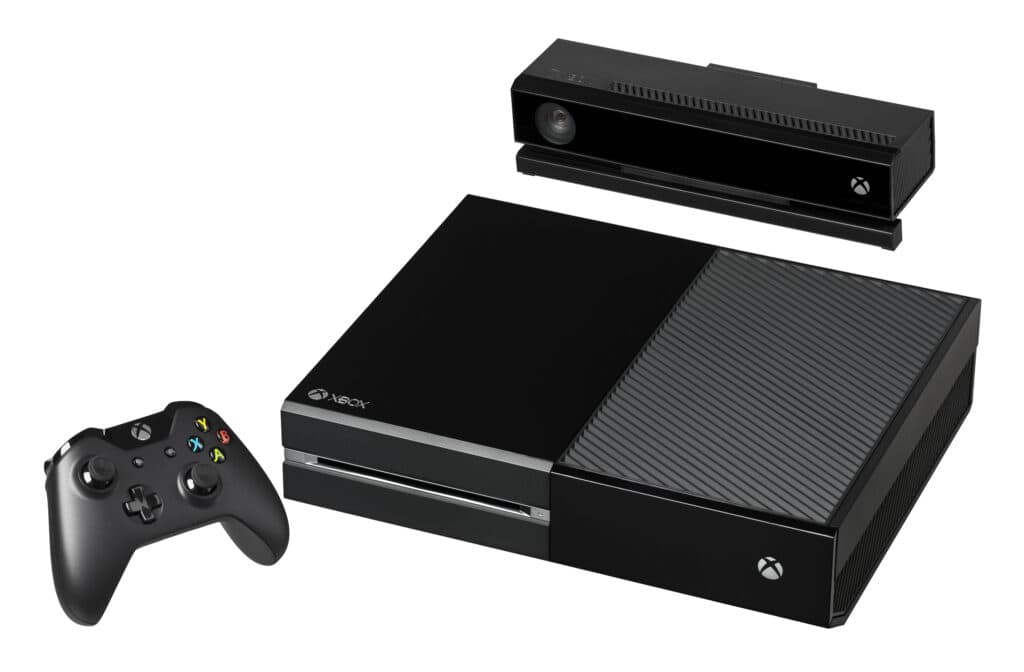
Key Takeaways
- The Xbox 360 Kinect offered an innovative, controller-free gaming experience.
- Expert reviews and consumer feedback provide a mixed assessment of its performance.
- The quality of the experience is highly dependent on the game titles available.
Kinect for Xbox 360: An In-Depth Look
The Kinect for Xbox 360 revolutionized gaming with its controller-free environment, allowing players to interact using gestures and voice commands. This section looks closely at the Kinect from unboxing to gameplay and comparison with competitors.
Unboxing and Set-Up Experience
Unpacking the Kinect for Xbox 360 reveals the sensor bar, a power supply cable, and a USB connection to link with the console. Setting it up is straightforward: connect it to your Xbox 360, follow the on-screen instructions, and you’re ready to start playing.
Kinect Sensor Technology and Features
The Kinect sensor is a sophisticated piece of tech featuring an RGB camera and a motion sensor. It captures the players’ movements and the surrounding area to interpret gestures and commands, allowing for a dynamic and completely controller-free gaming experience.
Gameplay and User Interaction
Games using the Kinect allow users to interact intuitively. Gestures and body movements control the game’s action, translating physical activity into in-game movement. This creates a unique interaction where the player’s body becomes the controller.
Fitness and Entertainment
Kinect also doubles as a fitness tool, with games like “Dance Central” and “Kinect Sports” providing a workout while playing. The Kinect’s entertainment options extend beyond gaming, as players can navigate the Kinect Hub and use voice commands to control media playback through Zune and navigate Xbox Live.
Game Library and Launch Titles
The Kinect launched with a variety of titles aimed at families and casual players, such as “Kinect Adventures” and “Joyride.” These games showcase the sensor’s capabilities and provide fun experiences without the need for a controller.
Compatibility and Integration
The Kinect integrates seamlessly with the Xbox 360, offering a hands-free way to interact with the system. Players navigate the menus with gestures and voice, and the sensor can support two active players simultaneously, recognizing and tracking their movements.
Design and Space Considerations
The glossy Kinect sensor is designed to complement the Xbox 360 with its sleek appearance. However, the sensor requires a fair amount of space in front of the TV to accurately capture movements, particularly for games that involve a lot of physical activity.
Comparison with Sony’s PlayStation Move and Nintendo Wii
Unlike the wand-style controllers of the PlayStation Move and the Wii remote of the Nintendo Wii, the Kinect offers a unique controller-free experience. While the Wii Sports games are iconic, the Kinect’s offering of voice and gesture control provides its own twist on motion-based gameplay.
Critiques and Consumer Feedback
When examining the Xbox 360 Kinect, critical reviews from professionals and user experiences blend to offer a rounded view of the product’s performance and reception. From technical operation to consumer satisfaction and market trends, understanding these insights is essential.
Professional and User Reviews
Professionals often cite the Kinect’s innovative technology that significantly expands the capabilities of the Xbox 360, however, they acknowledge the need for considerable space to use it effectively. Users echo this sentiment but add praise for the Kinect’s family-friendly appeal. It is common to see reviews mentioning fun experiences with the bundle, yet some express concerns about lag, especially when multiple players are engaged.
Common Questions and Concerns
Customers regularly inquire about Kinect’s calibration tests and its ability to effectively track movements without delay. Feedback suggests that proper setup is crucial and sometimes tricky. Concerns about the Kinect’s utility for two players are significant, with consumers frequently noting that a spacious playing area is necessitated to avoid issues.
Market Impact and Sales Performance
Since its release, the Kinect’s market impact has been notable, with strong initial sales. Microsoft has reported periods of high demand for the Kinect bundles, demonstrating the product’s early success. Over time, sales have fluctuated, aligning with the overall trends of Xbox 360 popularity in the marketplace.
Social Features and Online Connectivity
The Kinect expanded Xbox’s social features, incorporating face recognition for signing in and allowing users to connect with friends via Xbox Live for video chats. Users appreciated these upgrades for their convenience, though some were critical of the paid membership required for full access to social platforms like Facebook through the Xbox interface.
Future Prospects and Updates
Microsoft has continued to offer updates for the Kinect to enhance its compatibility and user experience with new technology and games. While the Kinect is no longer in frontline production, consumers remain interested in how updates can improve their existing devices. Many are keen to learn how the Kinect’s technology will be used or upgraded in future Microsoft products.
Frequently Asked Questions
In this section, we gather some common queries people have about the Xbox 360 Kinect and provide informative responses.
What are the best-rated games for Xbox 360 Kinect?
The Kinect’s library includes highly praised titles like “Dance Central,” which allows players to dance along to popular music tracks, and “Kinect Sports,” which offers a variety of active sports games to enjoy.
Is the Kinect still functional with the latest Xbox consoles?
The Kinect is compatible with the Xbox One through an adapter but is not supported by the Xbox Series X|S consoles.
For what reasons did Microsoft discontinue the Kinect for Xbox 360?
Microsoft stopped producing the Kinect due to decreasing consumer interest and a shift in focus towards gaming experiences that did not require accessories like the Kinect.
What notable limitations are associated with using the Kinect sensor?
Some recognized limitations include the need for ample space in front of the TV, potential inaccuracies in motion capture, and difficulties in recognizing quick or subtle movements.
How does Xbox 360 Kinect performance compare to newer motion-sensing technologies?
Relative to recent technologies, the Kinect may not capture motions as precisely but was pioneering for its time in offering a controller-free gaming experience.
Can Xbox 360 Kinect still be purchased new, and where might one find it?
While new Kinect units are no longer manufactured, they can be found through second-hand retailers or online marketplaces such as eBay or Amazon.