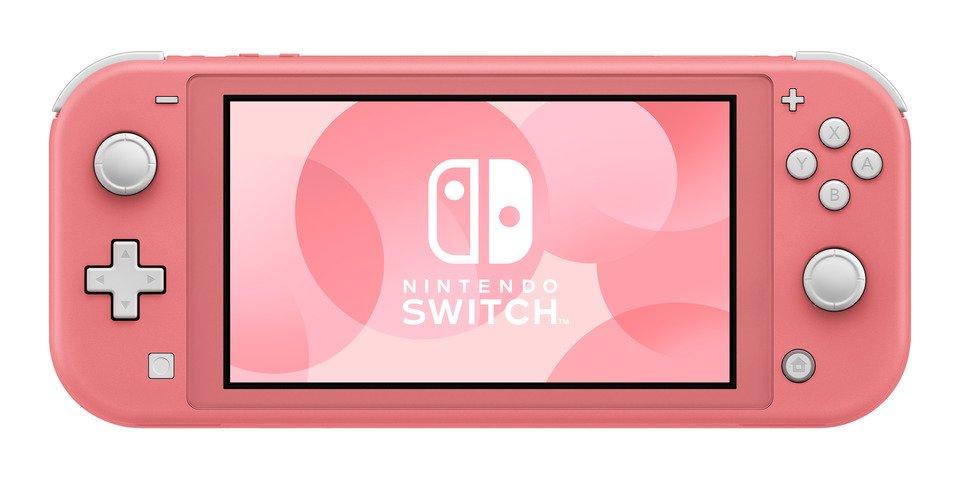
The Nintendo Switch Lite is designed as a dedicated handheld gaming device, and its features and capabilities differ in several ways from the original Nintendo Switch. Here’s a comprehensive look into the possibilities and limitations of using the Switch Lite as a controller for various platforms:
Short Answer
No, the Nintendo Switch Lite cannot be used as a controller.
Unlike standard Joy‑Cons or the Nintendo Switch Pro Controller, the Switch Lite is not designed to function as a separate input device for other consoles or systems.
Why the Switch Lite Can’t Be Used as a Controller
Several hardware and software limitations prevent the Switch Lite from working as a controller:
1. No Controller Mode
- The Switch Lite does not support a “controller” or “pairing” mode
- Nintendo did not include firmware that allows it to act as an input device
2. No Video Output
- The Switch Lite cannot connect to a TV or dock
- It’s intended for handheld play only, not multiplayer setups on a shared screen
3. Built-In Controls
- Unlike Joy‑Cons, the controls are permanently attached
- They can’t be detached or paired wirelessly with another console
Can You Use Switch Lite Controls for Local Multiplayer?
On the Same Switch Lite
- ✅ Yes, for local wireless multiplayer where each player has their own console and game
- ❌ No, for split-screen multiplayer on one device
Each player needs:
- Their own Switch or Switch Lite
- Their own copy of the game (physical or digital, depending on the title)
Can You Use a Switch Lite as a Controller for Another Switch?
❌ No.
The Switch Lite cannot act as a controller for:
- A standard Nintendo Switch
- A Switch OLED model
Even with local wireless or Bluetooth enabled, there’s no way to map its inputs to another console.
Can You Use a Switch Lite as a Controller for PC or Mobile?
❌ No.
The Switch Lite does not support:
- Bluetooth controller pairing
- USB controller mode
- Input mapping via third-party apps
Its Bluetooth is reserved for:
- Audio devices
- Local wireless communication between consoles
Workarounds and Alternatives
If you’re looking to add an extra controller or play multiplayer, here are better options:
Use Joy‑Cons
- Each Joy‑Con can be used as an individual controller
- Easy to pair with another Switch
Use a Pro Controller
- Comfortable for long gaming sessions
- Works with Switch, PC, and some mobile devices
Third-Party Controllers
- Many affordable options support Nintendo Switch
- Some also work on PC and mobile
When a Switch Lite Still Makes Sense
Even though it can’t be used as a controller, the Switch Lite is great for:
- Dedicated handheld gaming
- Traveling and commuting
- Local wireless multiplayer (each player with their own console)
- Younger players who prefer a smaller device
Frequently Asked Questions
Can you use a Switch Lite as a Joy‑Con?
No. Joy‑Cons use special firmware and pairing modes that the Switch Lite does not have.
Can you connect a Switch Lite to a TV?
No. The Switch Lite has no video output capability.
Can future updates enable controller mode?
Highly unlikely. This would require hardware-level changes, not just software updates.
Final Verdict
The Nintendo Switch Lite cannot be used as a controller, and there’s currently no workaround to make it act as one. If you need an extra controller, Joy‑Cons or a Pro Controller are your best options.
Using Switch Lite as a Controller for Nintendo Switch
- Compatibility with Original Switch: The Switch Lite cannot be used as a controller for the original Nintendo Switch. Unlike the original Switch, the Switch Lite does not have detachable Joy-Con controllers, which are necessary for it to function as a separate controller for another Switch console.
Using Switch Lite as a Controller for PC, Playstation, or Xbox
- PC, Playstation, and Xbox Compatibility: The Switch Lite cannot be used as a controller for PCs, Playstations, or Xbox consoles. This is because the Switch Lite lacks Bluetooth connectivity in its Joy-Con controllers since they are not designed to detach from the console. There is also no programmed interaction between the Switch Lite and these platforms that would facilitate such a use.
Understanding the Switch Lite Design and Features
- Built-in Controls: The Switch Lite has built-in controls, making it more durable and suitable for younger players or those preferring a more integrated gaming experience.
- Handheld Gaming Focus: The Switch Lite is primarily intended for handheld gaming, and it cannot be used to play games on a TV like the original Switch. It lacks detachable Joy-Con controllers and the ability to dock with a TV.
- Portability and Price Point: The Switch Lite is smaller, lighter, and less expensive than the original Switch, making it a more portable and budget-friendly option for gamers.
Alternatives for Multiplayer Gaming and Controller Options
- Multiplayer Gaming: For multiplayer gaming, if you own a Switch Lite, you will need additional controllers to play with others on a regular Switch console. The Switch Lite supports local wireless and online multiplayer modes, allowing you to play with others, but not as a separate controller for another console.
- Controller Options: If you need an alternative controller for the original Switch or other gaming platforms, various third-party options are available at different price points, providing an affordable alternative to official Nintendo Joy-Cons.
Conclusion
In summary, the Nintendo Switch Lite, with its unique design focused on handheld gaming, does not support being used as a controller for other devices, including the original Nintendo Switch, PCs, Playstations, or Xbox consoles. It is a standalone gaming device designed for portability and ease of use, especially for individual players or those who prefer gaming on the go. For multiplayer gaming, additional controllers compatible with the respective gaming platform would be required.